 SUPPORT


 3EX United States
 Blog
Imagine it’s 2 AM and a mission-critical server suddenly drops off the grid. You attempt to log in, but the IPMI is unresponsive, leaving you with no eyes on the hardware and a mounting sense of dread as the downtime clock ticks. Troubleshooting server issues remotely becomes a high-stakes guessing game when your primary management tools fail during a crisis. With global network outages having spiked by 178% at the start of 2026, the pressure to maintain technical stability and rapid recovery has never been higher.
It’s a frustrating reality that most administrators face: the uncertainty of whether a failure is a simple software glitch or a total hardware collapse. We’ve developed this guide to provide a systematic enterprise framework for identifying and resolving remote failures without ever needing physical data center access. You’ll learn how to verify hardware health, establish a foolproof out-of-band management strategy, and utilize modern protocols like Redfish to restore services within your SLA. We’ll show you how to maintain control and ensure reliability even when the standard paths are blocked.
Key Takeaways
- Establish a systematic hierarchy that prioritizes logical verification of software, network, and out-of-band layers before escalating to physical intervention.
- Master the technical framework for troubleshooting server issues remotely to identify kernel panics and resource exhaustion without direct console access.
- Leverage the management controller layer—including iDRAC, iLO, and IPMI—to maintain control even when the primary operating system is unresponsive.
- Learn how to effectively utilize data center Remote Hands support by drafting high-precision tickets that serve as your physical eyes and ears.
- Implement N+1 redundancy and dual-homed management paths to create a resilient infrastructure that prevents future remote access failures.
The Remote Troubleshooting Hierarchy: A Systematic Framework
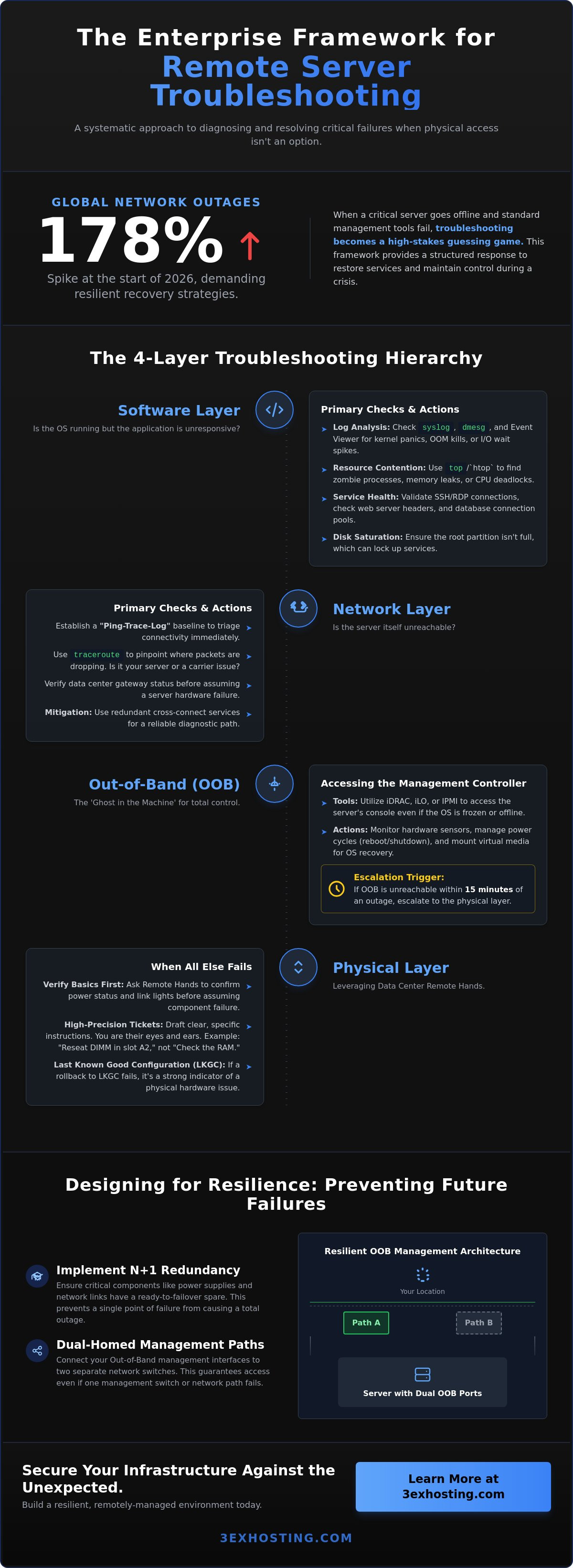
Modern infrastructure requires a structured response to downtime. In 2026, the definition of troubleshooting server issues remotely has evolved into a four-layer hierarchy: Software, Network, Out-of-Band, and Physical Hands. While you can’t “start at the bottom” by physically inspecting a rack from a different state, verifying the physical layer’s health is mandatory before diving into kernel debugging. You must confirm that the server has power and a link light before assuming the OS has crashed. This prevents hours of wasted effort on software configurations when a simple hardware failure is the culprit.
Establishing a “Ping-Trace-Log” baseline is your first step for immediate triage. If the server responds to ICMP but not to application requests, you’ve isolated the issue to the software layer. If there’s no response at all, the problem is likely network-based or a total system hang. Categorizing these failures early is critical. Transient software glitches, like memory leaks or zombie processes, can often be resolved through a remote shell. Terminal hardware fatigue, such as a failing NVMe drive or a burnt-out PSU, requires a different escalation path entirely.
Phase 1: Validating the Connectivity Path
It’s easy to assume a server is dead when it stops responding, but often the server is fine and the path is blocked. You must distinguish between a local system failure and a carrier-level routing issue. Use traceroute to see exactly where the packets stop. If the drop occurs at the data center gateway, the issue isn’t your server. To minimize these risks, many enterprises utilize redundant cross-connect services to ensure diagnostic paths remain open even if a primary carrier fails. This level of redundancy is essential for maintaining troubleshooting server issues remotely as a viable strategy during major network events.
Phase 2: Defining the Escalation Trigger
You need a clear point where software debugging stops and hardware intervention begins. Professionals don’t guess; they follow time-based SLAs. If you can’t reach the Out-of-Band Management interface within 15 minutes of a reported outage, it’s time to escalate. Always keep a record of the Last Known Good Configuration (LKGC). If a recent update caused the hang, a rapid rollback is your fastest path to recovery. If the LKGC fails to boot, you’ve reached the trigger point for physical assistance.
When the network path is clear but the application remains unreachable, the focus shifts to the internal software stack. Effective troubleshooting server issues remotely requires a surgical approach to log analysis. In Linux environments, the syslog and dmesg outputs are your primary tools for identifying kernel panics or hardware-induced soft locks. For Windows administrators, the Event Viewer provides critical insights into service failures and resource exhaustion. You’re looking for specific error codes that indicate the system is alive but unable to process requests, such as OOM (Out of Memory) kills or I/O wait spikes.
Identifying ‘Zombie’ processes and memory leaks is vital in high-performance computing or AI workloads. These processes consume PIDs and memory without performing work, eventually starving the system. If the access protocol itself is failing, you must troubleshoot the gateway. For Windows users, troubleshooting RDP connections often involves checking for NLA (Network Level Authentication) mismatches or port exhaustion. In contrast, SSH failures usually stem from key mismatches or corrupted configuration files. Validating service health means looking beyond the OS; you must check web server headers, database connection pools, and container orchestration states to ensure the entire microservice chain is functional.
Resolving Resource Contention and Deadlocks
CPU and memory spikes are often the symptoms of deeper resource deadlocks. Using tools like top or htop on Linux, and Performance Monitor on Windows, allows you to pinpoint exactly which thread is hogging cycles. One common but overlooked failure is disk saturation. When logs fill the root partition, the OS can no longer write temporary files, causing services to lock up entirely. Modern managed it infrastructure simplifies this by providing real-time telemetry. This allows you to catch these trends before they lead to a hard crash.
Network Protocol and Firewall Audits
A server might appear down when the issue is actually an expired SSL/TLS certificate or a DNS resolution failure. Always verify that your name servers are returning the correct A-records before assuming the hardware has failed. Additionally, automated security updates can sometimes reset local iptables or Windows Firewall rules, inadvertently blocking legitimate traffic. If you’re struggling to maintain these layers, our Remote Hands Support can provide the necessary local verification to ensure your software stack aligns with your physical configuration.
Out-of-Band Management: Accessing the ‘Ghost’ in the Machine
When the primary operating system hangs or the network stack crashes, traditional remote access tools like RDP and SSH become useless. This is where Out-of-Band (OOB) management becomes your lifeline. In 2026, enterprise-grade controllers like Dell’s iDRAC 9, HPE’s iLO 7, and Lenovo’s XClarity act as independent computers within the server. They run on dedicated hardware with their own power supply and network interface. This allows for troubleshooting server issues remotely even when the main processor is stuck in a boot loop or the motherboard has lost its primary power feed.
The industry is currently moving away from the aging IPMI 2.0 specification toward the more secure and scalable Redfish API. This shift is critical for automation. Modern OOB interfaces provide a Virtual KVM (Keyboard, Video, Mouse) over IP, giving you a direct console view of the BIOS and boot sequence. If a kernel panic occurs, you can see the exact error message on the screen, just as if you were standing in the data center with a crash cart. For total system freezes, you have two options: a motherboard-level reset via the BMC or a hard power cycle through a networked PDU (Power Distribution Unit). The latter is the ultimate “nuclear option” for hardware that refuses to respond to soft commands.
Recovering from a Frozen Management Controller
Sometimes the management controller itself becomes unresponsive. This “ghost in the machine” failure can be terrifying because it cuts off your last line of sight. Most modern systems allow you to perform a “warm reset” of the BMC without affecting the running OS. If that fails, you’ll need to rely on your redundant management VLANs. Security is paramount here. With 81% of CIOs reporting remote access security incidents in recent years, your OOB interfaces should never be exposed to the public internet. Always use a dedicated, encrypted VPN tunnel to reach your management network.
Hardware Health Telemetry
Proactive maintenance is better than emergency repairs. OOB tools provide real-time telemetry on voltage, fan speeds, and ambient temperatures. You can use SMART data to predict a drive failure before the RAID array actually degrades. This level of granularity is especially vital when monitoring high density GPU colocation thermal profiles. High-performance AI workloads generate massive heat. If you notice a specific GPU node consistently running 10 degrees hotter than its peers, you can investigate airflow obstructions or failing fans before the hardware throttles or shuts down. Mastering these telemetry logs is a cornerstone of troubleshooting server issues remotely at scale.
When Software Fails: Leveraging Data Center Remote Hands
There are moments when the virtual console goes dark and the network remains silent. In these scenarios, troubleshooting server issues remotely hits a physical wall. This is where Remote Hands Support becomes your most valuable asset. These on-site technicians handle the tasks you cannot perform from a distance, such as cable reseating, drive swaps, and visual LED status checks. For enterprises running mission-critical full cabinet colocation, 24/7 access to these experts is the difference between a minor blip and an extended outage.
Effective communication is the key to a successful remote intervention. A vague ticket like “server is down” leads to billable time spent on discovery rather than resolution. You must provide exact rack locations, unit numbers, and specific instructions. Tell the technician to check the amber warning lights on the second power supply or to verify if the link light on the primary NIC is active. Precision in your request ensures that the technician can execute the task immediately, which is vital when emergency requests carry significant premiums. It’s about providing the clear technical guidance they need to be your hands.
Visual Triage and Physical Verification
Technicians can audit the Physical Layer of the OSI model in ways software cannot. A “look-see” request can identify loose power connectors or tripped circuit breakers that don’t report through the BMC. During thermal events, on-site staff can verify airflow and hot/cold aisle integrity. They can confirm if a floor tile has been misplaced or if a blanking panel is missing, causing recirculation. This visual feedback completes the diagnostic picture for troubleshooting server issues remotely, allowing you to rule out environmental factors before replacing expensive components.
Hardware Replacement Protocols
When a hardware failure is confirmed, you must coordinate the replacement. This involves shipping parts and scheduling the installation. Professional data center staff follow strict ESD (Electrostatic Discharge) procedures to protect your sensitive components during swaps. We apply the same meticulous deployment support mindset to emergency repairs as we do to initial setups. This ensures every component is seated correctly and labeled properly before the ticket is closed. It’s about maintaining technical stability through every physical touchpoint, ensuring that once a part is swapped, the system returns to its optimal state without further intervention.
If you need immediate physical intervention to restore your systems, contact us today to learn more about our Remote Hands Support services.
Designing for Resilience: Preventing Future Remote Failures
Resilience begins at the architectural level. The goal of any enterprise engineer is to make troubleshooting server issues remotely a rare necessity rather than a daily routine. This requires implementing N+1 redundancy across all critical systems, including power, network, and hardware components. When a single PSU fails or a top-of-rack switch reboots, your system should continue to operate without triggering an emergency response. Redundancy must also extend to your management tools. Relying on a single IPMI port is a significant risk; dual-homed management paths ensure you maintain access even if a local management switch fails.
For high-availability applications, integrating robust disaster recovery solutions allows for automated failover to secondary sites. This buys your team time to diagnose the root cause without the pressure of an active service outage. To assist on-site technicians, maintain a digital ‘Troubleshooting Kit’. This includes standardized cable labeling, up-to-date rack diagrams, and clear documentation. When a technician arrives at your rack, they shouldn’t have to guess which cable to pull or which unit is misbehaving. Clear, physical labeling is the best gift you can give your remote self.
Infrastructure Hardening for AI and GPU Loads
AI clusters demand specialized cooling and power configurations that standard racks can’t always provide. Because GPU servers pull significantly more power, AI infrastructure hosting requires aggressive remote monitoring to prevent circuit breaker trips. You must monitor power draw at the PDU level in real-time. If a node begins to exceed its thermal or power threshold, automated scripts should throttle the workload before a hard shutdown occurs. This proactive approach prevents the very hardware failures that make troubleshooting server issues remotely so difficult and high-stress.
Strategic Colocation for Remote Management
Your choice of facility directly impacts your ability to manage systems during a crisis. Selecting a carrier hotel offers maximum interconnectivity, providing multiple paths for your data and management traffic. Choosing private data center suites adds a layer of physical security and dedicated infrastructure for your management hardware. This isolation ensures that your diagnostic tools remain available even if the public network faces congestion or attacks.
Final Checklist: Is your infrastructure ready?
- Are all OOB interfaces on a separate, dedicated management VLAN?
- Do you have a secondary VPN path to the data center gateway?
- Is your ‘Remote Hands’ documentation and labeling updated in the last 90 days?
- Are power loads balanced across redundant PDUs to allow for single-side maintenance?
Building for stability today ensures you won’t be caught off guard tomorrow. By treating your remote management path as a mission-critical service, you turn potential disasters into manageable technical tasks.
Securing Your Infrastructure Against the Unexpected
We provide the stable technical foundation your business needs to thrive. Our facilities offer carrier-neutral connectivity and high-density AI & GPU infrastructure designed for the most demanding modern workloads. When software fails and physical intervention is mandatory, our 24/7/365 on-site remote hands are ready to restore your services with precision and speed. Don’t leave your uptime to chance. Get a Quote for Enterprise Colocation with 24/7 Remote Hands Support today and ensure your systems are always in expert hands. You’ve built a powerful environment; let’s keep it running at peak performance.
Frequently Asked Questions
What is the first thing to check when a server is unreachable?
The first step is to verify connectivity to the Out-of-Band (OOB) management interface. If you can reach the iDRAC or iLO but the primary OS is unresponsive, you’ve isolated the failure to the software layer. If both the OS and the management interface are unreachable, perform a traceroute to determine if the issue lies with the carrier or the local data center network. This baseline triage is essential for troubleshooting server issues remotely without wasting time on the wrong layer.
How do I troubleshoot a server if IPMI is not responding?
When the management controller hangs, attempt a BMC reset through your management software or a hard power cycle via a networked PDU. If the controller remains silent, it usually indicates a local management network failure or a hardware fault. At this stage, you should contact on-site technicians to verify the link lights on the dedicated management port. They can perform a physical power draw check to see if the motherboard is receiving any current at all.
What is the difference between Remote Hands and Smart Hands?
Remote Hands generally covers physical tasks like toggling power switches, reseating cables, or swapping pre-configured drives. Smart Hands is a more advanced service that includes complex technical troubleshooting, OS-level configurations, and hardware diagnostics. Most data centers bill these services in 15 or 30 minute increments to ensure efficient resource allocation. Having clear documentation helps technicians execute these tasks faster, reducing your mean time to resolution during a crisis.
Can I fix a RAID failure remotely?
You can manage a RAID rebuild remotely as long as the controller is functional and a hot spare is available. Through the BIOS or a management utility, you can designate the spare and monitor the rebuild progress in real-time. If multiple drives have failed and no spares remain, you’ll need to coordinate a physical drive replacement with the data center staff. Once the new drive is seated, you can initiate the array restoration through your remote console.
How do I diagnose a network issue versus a server hardware issue?
Use a combination of traceroute and OOB telemetry to distinguish between these failures. If traceroute shows packets reaching the data center gateway but failing at the local hop, it’s often a network configuration or firewall issue. If the server’s management interface reports a “Critical Hardware Alert” or a power supply failure, you’re dealing with a physical hardware issue. Identifying this early prevents you from chasing ghost network bugs when a component has actually failed.
What tools are essential for remote server troubleshooting in 2026?
Modern environments rely on the Redfish API for scalable management and Virtual KVM for direct console access. Secure tools like OpenSSH 10.3 and PowerShell 7.7 are essential for command-line diagnostics and automation. Additionally, networked PDUs are mandatory for performing hard power resets when the motherboard’s management controller becomes unresponsive. These tools provide the necessary visibility and control required for troubleshooting server issues remotely in high-density AI or GPU environments.
How can I prevent a server from locking up during a reboot?
To prevent reboot hangs, ensure that “Wait for F1 on Error” is disabled in the BIOS settings. This prevents the system from pausing the boot sequence for non-critical hardware warnings like a missing keyboard or a fan speed alert. Always monitor the POST process through a Virtual KVM session so you can intervene immediately if the system gets stuck. Checking the boot order before initiating the restart ensures the server doesn’t attempt to boot from an empty PXE target.
Is it possible to reinstall an OS remotely?
Reinstalling an operating system is entirely possible using Virtual Media features found in modern iDRAC, iLO, or IPMI interfaces. You can mount a remote ISO image from your local workstation or a central network share and set the BIOS to boot from that virtual drive. This allows you to perform a full clean installation, run recovery tools, or update firmware without ever needing to physically visit the data center or use a local USB drive.