 SUPPORT


 3EX United States
 Blog
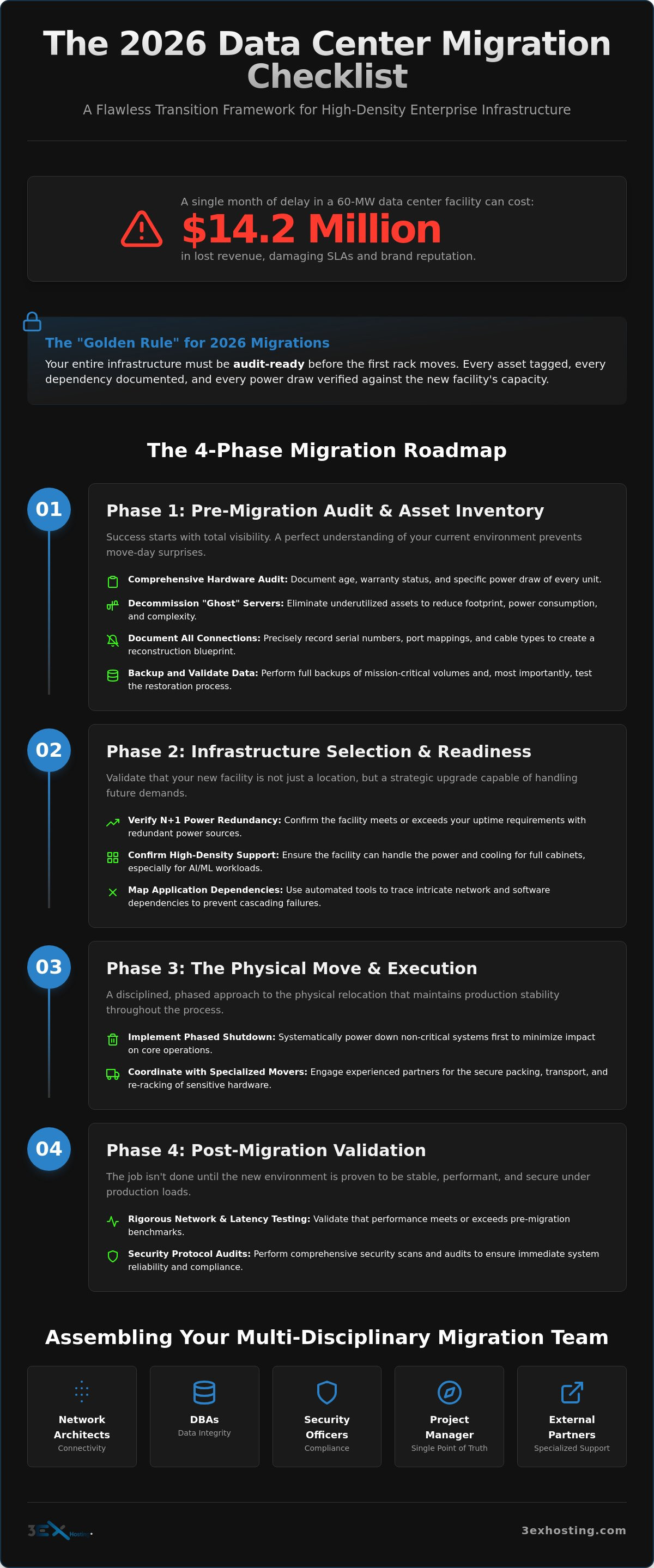
A single month of delay in a 60-MW data center facility can cost your organization up to $14.2 million in lost revenue. When you’re managing an enterprise move of this scale, the margin for error effectively disappears. You’re likely feeling the weight of mapping intricate network dependencies while worrying about whether your new facility can actually handle the power and cooling demands of high-density AI workloads. It’s a high-stakes environment where hardware damage or unplanned downtime isn’t just an inconvenience. It’s a direct threat to your operational stability.
We understand that a successful move requires more than just logistics. It demands a rigorous, technical framework. This guide provides a comprehensive data center migration checklist for 2026, designed to deliver a flawless transition with zero data loss and minimal downtime. We’ll walk through the essential steps to validate high-density readiness and reduce your post-migration overhead. You’ll gain a clear roadmap to move your infrastructure into a more scalable, reliable environment while ensuring every rack and cross-connect is optimized for performance from day one.
Key Takeaways
- Identify and decommission underutilized “ghost” servers during the audit phase to streamline your physical footprint and reduce move-day complexity.
- Utilize a technical data center migration checklist to map intricate network dependencies and ensure every asset is accounted for before transport.
- Verify that your new facility provides N+1 power redundancy and supports high-density full cabinet colocation for scalable enterprise growth.
- Implement a phased shutdown strategy that prioritizes non-critical systems to maintain production stability throughout the relocation process.
- Validate operational success post-move with rigorous network latency testing and security protocol audits to ensure immediate system reliability.
The Strategic Framework: Why Data Center Migrations Fail in 2026
A data center migration isn’t just a physical relocation of hardware. It’s a fundamental strategic shift that recalibrates your entire IT ecosystem. In 2026, the complexity of hybrid environments means that simply moving racks from Point A to Point B is a recipe for disaster. Most failures occur because teams treat the move as a logistics problem rather than an architectural one. You aren’t just moving servers; you’re transitioning the heartbeat of your business operations.
The primary causes of migration failure are poor dependency mapping and inadequate power testing. If you don’t understand how your applications interact, you’ll face cascading failures the moment you flip the switch. This is why a comprehensive data migration process must be integrated into your overarching data center migration checklist. You can’t afford to discover a missing VLAN or a legacy database connection while your production environment is offline. Technical stability depends on total visibility.
We follow a “Golden Rule” for 2026 migrations: your entire infrastructure must be audit-ready before the first rack moves. This means every asset is tagged, every dependency is documented, and every power draw is verified against the new facility’s capacity. Project owners play a critical role here. They bridge the gap between IT teams, who focus on data integrity, and facility management, who focus on the physical environment. Without this bridge, communication breaks down and downtime increases.
Quantifying Migration Risks and Downtime Costs
There’s a massive difference between a planned maintenance window and a catastrophic migration failure. Research shows that a delay in a 60-MW facility can result in lost revenue of $14.2 million per month. Beyond the immediate financial hit, unplanned downtime shreds enterprise SLA commitments and damages brand reputation. Reliability is your most valuable currency. To mitigate these risks, your timeline must include a “buffer period” for unforeseen technical hurdles. This isn’t wasted time; it’s an insurance policy against total system failure.
Assembling the Multi-Disciplinary Migration Team
Success depends on bringing together the right experts from across the organization. Your internal team should include Network Architects to handle connectivity, DBAs to manage data integrity, and Security Officers to ensure compliance with 2026 standards. You’ll also need external partners, such as specialized movers and colocation providers who offer move-in assistance to handle the heavy lifting. The Project Manager acts as the single point of truth for the entire migration, ensuring that every stakeholder is aligned and every milestone is met on schedule.
Phase 1: The Pre-Migration Audit and Asset Inventory
Success starts with visibility. Before the first cable is unplugged, you must have a perfect understanding of your current environment. A robust data center migration checklist begins with a comprehensive hardware audit. This isn’t just a list of server names. It’s a technical deep dive into the age, warranty status, and specific power draw of every unit in your racks. If a piece of hardware is nearing the end of its lifecycle, moving it might be riskier than replacing it.
Use this phase to identify and decommission “ghost” servers. These are underutilized or forgotten assets that consume power and rack space without delivering business value. Eliminating these before the move reduces your physical footprint and move-day complexity. Once the inventory is lean, document every physical connection. Record serial numbers, port mappings, and cable types with precision. This ensures that the reconstruction of your environment at the new site is a matter of following a map, not solving a puzzle.
Data integrity is your highest priority. Perform a full backup of all mission-critical volumes and, more importantly, validate those backups. A backup that hasn’t been tested for restoration is just a collection of bits. If you’re managing a high-scale environment, consider leveraging Remote Hands Support to assist with the physical tagging and verification process. It’s a practical way to ensure accuracy without pulling your core engineering team away from high-level planning.
Mapping Hardware Dependencies and Interconnections
Modern applications are rarely isolated. Use automated discovery tools to map complex application-to-server dependencies. This reveals “hidden” legacy connections that often break during a relocation. Your goal is to create a logical network map that mirrors the target facility’s layout. This prevents routing issues and ensures that latency remains within acceptable limits after the transition. Don’t rely on memory; rely on data-driven discovery.
Finalising the Disaster Recovery and Back-out Plan
Every migration needs a clear “Point of No Return.” This is the specific time during the move weekend when continuing the migration is safer than trying to revert. You must outline every step required to restore services at the original site if a critical failure occurs before this point. Integrating disaster recovery solutions into your pre-move plan provides the safety net your enterprise needs to maintain business continuity during high-stakes infrastructure changes.
Phase 2: Infrastructure Selection and High-Density Readiness
Selecting the right target facility is the most permanent decision in your data center migration checklist. Once your hardware is racked and cabled, changing locations becomes exponentially more expensive and risky. Electrical and power systems typically account for 40 to 50% of total data center construction costs, so verifying their reliability is paramount. You must evaluate the facility’s ability to provide N+1 or 2N redundancy for both power and cooling. In 2026, anything less represents an unacceptable risk for enterprise-scale operations. Look for providers that offer full cabinet colocation to ensure you have dedicated, scalable space.
Physical security and operational support are equally critical. A modern facility should utilize multi-factor biometric access and comprehensive CCTV coverage to meet evolving compliance standards like SOC 2 and ISO 27001. For organizations with strict isolation needs, cage solutions datacenter options provide an essential layer of physical protection. Beyond the hardware, assess the availability of on-site technical support. Having experts available for Remote Hands Support can be the difference between a minor adjustment and a prolonged outage during the critical first week at the new site.
Preparing for AI and High-Density GPU Workloads
Modern GPU clusters require specialized power densities that standard data centers aren’t built to handle. While a typical enterprise rack might pull 10kW, AI infrastructure often demands 30kW to 100kW per cabinet. Standard air cooling frequently fails under these intense thermal loads. You need to verify if the facility supports liquid cooling or specialized hot aisle containment. For a deep dive into these specific technical requirements, refer to the High-Density GPU Colocation guide. Building for AI today prevents a costly secondary migration tomorrow.
Strategic Connectivity and Cross-Connect Planning
A carrier-neutral environment is non-negotiable for network flexibility. It allows you to select from multiple providers, ensuring competitive performance and redundancy. Utilizing cross-connect services directly within the facility reduces latency by bypassing the public internet for critical peering and cloud on-ramps. When planning your network, insist on diverse fiber paths. This prevents a single point of failure from taking down your entire connection. Network redundancy is just as vital as power redundancy for maintaining your enterprise SLAs.
Phase 3: The Physical Move and Execution Logistics
Execution day is the high-stakes culmination of your planning. This is where your data center migration checklist moves from paper to the loading dock. A successful execution requires a phased shutdown strategy. Begin with non-critical dev and test environments to validate your power-off procedures. Only once these are verified should you move to your core production environments. This sequential approach provides a final safety check before the hardware leaves the rack.
When dealing with high-value enterprise hardware, standard logistics providers are insufficient. You need specialized data center movers who utilize anti-static packaging and climate-controlled transport vehicles. Specialized white-glove moving services are mandatory for enterprise SANs to ensure that delicate drive alignments and controller integrity remain intact during transit. Managing insurance and liability is equally vital. Ensure your carrier’s policy specifically covers the replacement value of your hardware, not just its weight or age.
Once the equipment arrives at the target facility, the “Rack and Stack” process begins. Your team must follow the pre-designed cabinet elevations created during the audit phase. This isn’t the time for improvisation. Every server and switch must be placed according to the master plan to ensure that airflow and cabling remain optimized for the new environment’s cooling profile. Verify power-on sequences immediately and perform initial hardware health checks to catch any “dead on arrival” components before the network configuration begins.
Coordinating the “Lift and Shift” Logistics
Precision packaging is your first line of defense against hardware failure. Anti-static wrapping and custom-fit foam inserts prevent electrostatic discharge and vibration damage. Climate control during transport is non-negotiable for 2026 enterprise standards, as extreme temperature fluctuations can cause condensation within internal components. Document the chain of custody at every transition point to maintain total accountability for your assets. This level of detail ensures that your hardware arrives in the same operational state it left.
Leveraging Remote Hands for Seamless Deployment
Professional remote hands support transforms a chaotic move into a controlled deployment. These on-site experts handle the physical unboxing and cabling, allowing your senior engineers to focus on high-level system validation and network configuration. This division of labor significantly reduces the “mean time to recovery” for your services. For a deeper look at optimizing these resources, review the Enterprise Guide to Data Center Efficiency. Having 24/7 on-site assistance ensures that any power-on issues or link failures are resolved immediately without waiting for a technician to travel to the site.
Ready to secure your transition with expert support? Request a quote for professional move-in assistance today.
Phase 4: Post-Migration Validation and Operational Excellence
The physical move is finished, but the migration isn’t complete until every system is validated. This final phase of your data center migration checklist ensures that the performance you planned for is actually delivered. Start with comprehensive network testing. You need to measure latency, packet loss, and throughput across all primary and redundant paths. If you find discrepancies, address them before the full production load hits the system. Technical stability depends on these metrics being perfect from the start.
Validate your security protocols immediately. Check every firewall rule and VPN access point to ensure no configurations were lost or corrupted during the transition. Once the network is secure, conduct a “Day 1” audit. Update your DCIM records so that every asset’s new location, power port, and network connection is documented with 100% accuracy. Reliable documentation prevents operational headaches later. Finally, establish a long-term maintenance schedule with your facility provider to ensure ongoing reliability and uptime.
Testing Connectivity and Application Performance
End-to-end testing for user-facing applications is the only way to confirm success. Don’t just check the server; check the user experience. Use your new facility’s cross-connects to optimize traffic flow and reduce hops between your infrastructure and key cloud providers. While you focus on the new site, don’t forget the old one. Decommission the previous facility properly. This includes secure data erasure from any retired hardware to maintain compliance and prevent data leaks. It’s the final step in closing the loop on your migration project.
Transitioning to Managed Infrastructure Support
The project now shifts from “moving” to “managing.” Maintaining a high-density environment requires constant vigilance. Leveraging professional managed IT infrastructure services can significantly reduce the operational burden on your internal teams. It allows your architects to focus on innovation while experts handle the background stability. If you’re still in the planning stages, get a quote for professional move-in assistance to ensure your transition to operational excellence is flawless. Expert support ensures your new facility delivers the scalability your business requires.
Securing Your Infrastructure for a Scalable Future
A successful transition in 2026 requires moving beyond basic logistics to embrace technical precision. By following a structured data center migration checklist, you ensure that every network dependency is mapped and every power requirement is validated before the first rack is powered down. This process transforms a high-risk relocation into a strategic upgrade. It positions your enterprise to handle the intense demands of modern AI and GPU workloads without the fear of unplanned downtime or data loss.
Realizing this vision of stability doesn’t have to be a solo effort. We provide the technical foundation you need with N+1 power and cooling redundancy and infrastructure that’s fully high-density GPU ready. Our experts work behind the scenes with 24/7 on-site remote hands support to ensure your systems remain secure and performant at every stage. Your next facility should be a foundation for growth, not a source of anxiety.
Plan your flawless transition with 3EX Hosting Move-In Assistance. With the right roadmap and expert support, your infrastructure is in safe hands.
Frequently Asked Questions
What is the most common reason for data center migration failure?
Poor dependency mapping is the leading cause of migration failure in complex enterprise environments. If your team doesn’t have a total understanding of how applications interact with specific databases and network segments, services won’t restart correctly at the new site. This lack of visibility leads to cascading errors and unplanned downtime that can last days rather than hours.
How long does a typical enterprise data center migration take?
A typical enterprise migration takes between six and twelve months from the initial audit to final validation. This timeline provides enough room for a thorough asset inventory, infrastructure selection, and several rounds of testing. Rushing this process often results in missed dependencies or inadequate power testing, which increases the risk of catastrophic failure during the move.
Should I move my hardware or migrate to a managed cloud environment?
The choice depends on your specific workload requirements and cost structure. Many organizations with data-intensive AI workloads are choosing colocation over public cloud to gain better control over their hardware and avoid high egress fees. This trend, often called cloud repatriation, allows businesses to utilize high-density power and cooling that standard cloud providers might not offer at a competitive price.
What is a back-out plan in a data center migration?
A back-out plan is a documented contingency strategy to restore all IT operations at the original facility if the move fails. It defines a specific “point of no return” during the migration weekend. Before this point, the team can still safely revert to the original site. After this point, the move must continue because reverting would cause more downtime than fixing the issues at the new site.
How do I handle high-density GPU servers during a migration?
High-density GPU servers require specialized climate-controlled transport and anti-vibration packaging to prevent hardware damage. Your data center migration checklist must include a verification step to ensure the target facility can provide the necessary 30kW to 100kW per rack. Standard cooling often fails for these workloads, so you must confirm that the new site supports advanced thermal management or liquid cooling.
What are the benefits of using a carrier-neutral data center for my new site?
Carrier-neutral facilities offer network flexibility by allowing you to connect with multiple ISPs and cloud providers within the same building. This environment prevents vendor lock-in and encourages competitive pricing. It also allows you to use direct cross-connect services to optimize traffic flow, which significantly reduces latency compared to routing traffic over the public internet.
How much downtime should I expect during a data center relocation?
You should expect a planned downtime window ranging from four to twelve hours for the physical relocation of production hardware. By following a rigorous data center migration checklist and using a phased approach, you can minimize this window. Non-critical systems are moved first to validate the process, ensuring that the core production environment is offline for the shortest time possible.
Do I need specialized insurance for moving server hardware?
Yes, specialized inland marine insurance is necessary to protect high-value enterprise hardware during transit. Standard carrier liability is typically based on the weight or age of the equipment, which doesn’t cover the full replacement cost of modern SANs or GPU clusters. You must ensure your policy covers the total market value of the assets to mitigate financial risk if an accident occurs.