 SUPPORT


 3EX United States
 Blog
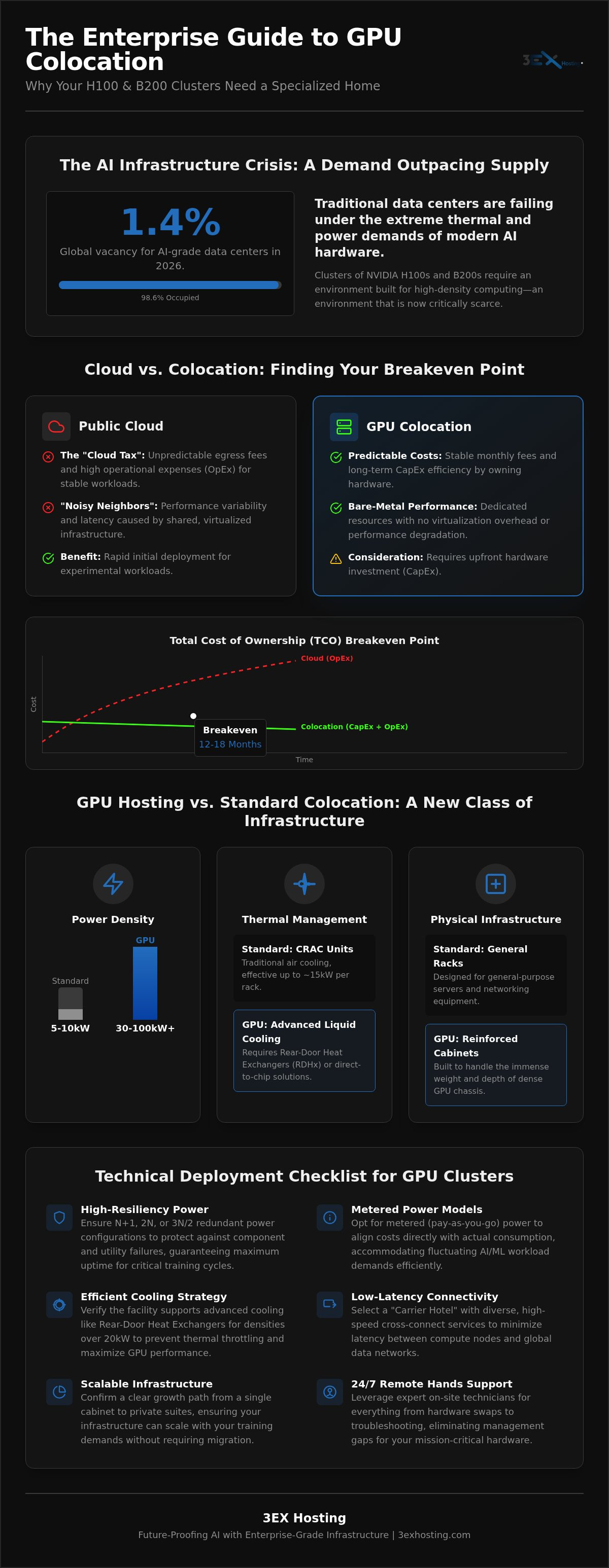
Global vacancy for AI-grade data center facilities has plummeted to just 1.4% in 2026. This scarcity means that securing the right environment for your hardware is now as critical as the silicon itself. You’ve likely experienced the “cloud tax” firsthand through unpredictable egress fees and performance dips caused by noisy neighbors. If you’re managing H100 or B200 clusters, you know that standard data centers simply don’t have the power density to keep up. Transitioning to colocation GPU hosting offers a path toward stability, but it requires a precise understanding of high-density infrastructure.
We understand the anxiety of moving mission-critical hardware away from your immediate oversight. This guide shows you how to master the technical and economic requirements of GPU colocation to scale your AI workloads with enterprise-grade reliability. You’ll learn how to achieve predictable monthly costs while maintaining maximum uptime through redundant high-density power. We’ll also look at how scalable infrastructure and expert remote hands support can ensure your clusters grow alongside your training demands without the risk of hardware failure or management gaps.
Key Takeaways
- Understand why traditional data centers fail under the thermal demands of H100 and B200 clusters and how to evaluate high-density cooling requirements.
- Calculate the Total Cost of Ownership (TCO) over a three-year lifecycle to find your breakeven point between cloud rentals and owned hardware.
- Discover how colocation GPU hosting eliminates “noisy neighbor” latency and unpredictable egress fees by providing dedicated, bare-metal performance.
- Follow a technical deployment checklist to ensure hardware compatibility, covering everything from rack depth specifications to intelligent PDU selection.
- Learn how to scale your AI infrastructure seamlessly from a single full cabinet to private suites while utilizing Remote Hands support for 24/7 reliability.
What is Colocation GPU Hosting and Why Does AI Demand It?
Understanding What is Colocation GPU Hosting starts with the hardware itself. It’s the practice of housing specialized high-compute servers in data centers engineered specifically for extreme power draw and heat dissipation. While traditional workloads relied on general-purpose CPUs for sequential processing, modern AI and machine learning tasks require the massive parallelization of GPUs. This fundamental shift in compute architecture has rendered standard colocation facilities, which typically offer 5kW to 10kW per rack, obsolete for enterprise AI clusters.
The move toward colocation GPU hosting is often driven by the “cloud tax.” While public clouds offer rapid deployment, the total cost of ownership for stable workloads typically hits a breakeven point within 12 to 18 months. Transitioning from an OpEx-heavy cloud model to owning your hardware allows for better long-term CapEx efficiency. It also eliminates the performance variability and “noisy neighbor” issues found in virtualized environments. For enterprises running 24/7 training cycles, owning the silicon and colocating it provides a level of cost predictability that the cloud cannot match.
The Rise of High-Density AI Infrastructure
Generative AI training demands infrastructure that didn’t exist five years ago. 2026-era hardware, such as NVIDIA Blackwell architectures, has redefined rack power requirements. A single GB200 NVL72 rack can demand staggering amounts of power, far exceeding the limits of traditional raised-floor environments. This evolution impacts everything from the electrical busway to the physical floor loading. Large-scale inference also requires constant, high-speed data flow. This is where the “Carrier Hotel” model becomes vital. By placing GPU clusters in a facility with high-speed cross-connect services, enterprises reduce latency between their compute nodes and the global networks feeding them data.
GPU Hosting vs. Standard Colocation: Key Differences
The physical requirements of GPU hosting are starkly different from general-purpose server hosting. Power density has jumped from a modest 15kW to 50kW or even 100kW per cabinet. Traditional Computer Room Air Conditioning (CRAC) units can’t handle the concentrated heat of an H100 or B200 cluster. Thermal management now requires advanced containment or liquid-to-chip cooling solutions. Additionally, the sheer weight of dense GPU chassis and their specialized power supplies requires reinforced cabinets. Utilizing a full cabinet colocation solution designed for high-density loads ensures your infrastructure remains stable under the most intensive computational stress.
Technical Infrastructure Requirements for GPU Clusters
Deploying high-performance clusters requires more than just rack space. It demands a specialized environment where electrical and thermal limits are pushed to the edge. Modern colocation GPU hosting facilities must provide a foundation that standard enterprise data centers simply aren’t equipped for. This involves a fundamental redesign of power delivery, physical support systems, and low-latency network fabrics.
High-Density Power and Redundancy
GPU power supply units (PSUs) are notoriously demanding. Calculating the total power draw for a cabinet full of NVIDIA H100 or B200 nodes often reveals requirements exceeding 30kW per rack. We recommend metered power models for these deployments; they allow you to pay for actual consumption as your AI training workloads fluctuate. Redundancy is equally vital. N+1 power redundancy ensures that a single component failure in the power chain won’t interrupt your mission-critical AI training cycles. For higher resiliency, 2N or 3N/2 configurations provide completely independent power paths to the hardware, protecting against utility-side failures.
Cooling Strategies for 30kW+ Racks
Traditional air cooling reaches its physical limits at around 15kW to 20kW per rack. To support higher densities, infrastructure must transition to advanced solutions like Rear-Door Heat Exchangers (RDHx) or direct-to-chip liquid cooling. These systems remove heat at the source, preventing the thermal throttling that can cripple GPU performance. Precise airflow management remains necessary to protect non-liquid-cooled components like networking gear. If you’re currently planning a high-density deployment, Optimizing Power Density for Enterprise Racks provides a deeper look into these thermal thresholds and how to manage them.
Beyond power and cooling, the network fabric is the nervous system of your cluster. Distributed training relies on low-latency interconnections like InfiniBand or specialized high-speed Ethernet to synchronize gradients across nodes without delay. Physical infrastructure must also account for floor loading. A fully populated 52U cabinet of GPU servers can weigh over 3,000 pounds. This requires reinforced flooring and specialized seismic bracing to ensure long-term stability and safety. If your current facility can’t meet these rigorous specs, consider moving to a full cabinet colocation solution built specifically for the demands of the AI era.
GPU Colocation vs. Public Cloud: A Cost and Performance Analysis
Hyperscalers offer an undeniable benefit: immediate access to compute. However, for enterprises with steady-state AI workloads, the convenience of the cloud often comes at a premium that erodes long-term margins. A comprehensive Total Cost of Ownership (TCO) analysis over a 3-year hardware lifecycle typically favors colocation GPU hosting. While the initial capital expenditure is higher, the recurring monthly costs are significantly lower. Industry data suggests the economic breakeven point between renting and owning hardware occurs within 12 to 18 months. Beyond this window, the public cloud becomes a liability for cost-sensitive projects.
Performance: The ‘Noisy Neighbor’ Problem
In a virtualized cloud environment, your workloads share underlying physical resources with other tenants. This often results in GPU performance jitter, where training times vary due to shared PCIe lanes or network congestion. By moving to High-Density GPU Colocation: The Enterprise Guide to AI Infrastructure in 2026, you gain exclusive access to bare-metal hardware. This dedicated environment ensures that every TFLOPS of compute power is available to your model without interference from external workloads.
The Economics of Data Egress
The “Cloud Tax” is most visible when moving large datasets. Hyperscalers often implement steep egress fees that make it prohibitively expensive to export data once it’s inside their ecosystem. For AI companies processing petabytes of training data, these hidden costs can derail a budget. Colocation solves this through carrier-neutral interconnections. By utilizing high-speed cross-connect services, you gain direct access to global networks and peering points. This infrastructure allows you to move data efficiently while maintaining predictable monthly costs.
Security and compliance also play a role in this decision. Private suites and custom cages provide a level of physical isolation that the public cloud cannot replicate. For organizations developing proprietary models or handling sensitive user data, this isolation is essential for meeting strict data sovereignty requirements. Hardware ownership allows you to control the entire stack, from the BIOS to the operating system, ensuring that your AI models remain within your secure perimeter. If you’re ready to stabilize your infrastructure costs, exploring a full cabinet colocation strategy is the next logical step.
Planning Your Deployment: The GPU Colocation Checklist
Moving from a cloud environment to a physical data center requires a rigorous hardware audit. Standard 42U racks often lack the depth needed for the oversized chassis of modern GPU nodes. You must verify that your rail kits are compatible with 1200mm deep cabinets to ensure proper airflow and cable clearance. Power Distribution Units (PDUs) are another critical component. For colocation GPU hosting, we recommend intelligent or switched PDUs. Intelligent models provide outlet-level monitoring, while switched PDUs allow you to power cycle individual nodes remotely. This granular control is essential for identifying PSU failures before they trigger a cluster-wide outage.
Hardware and Rack Integration
Electrical specifications are your first hurdle. High-density GPU servers frequently require 208V, 240V, or 415V inputs to operate efficiently. Plugging these units into a standard 110V circuit is impossible and dangerous. Cable management also demands precision. High-speed fabrics like InfiniBand or 400G Ethernet use delicate fiber optics or thick DAC cables that require specific bend radii to maintain signal integrity. Our Move-in Assistance team helps manage these logistics, ensuring that your hardware is handled with the care a six-figure investment deserves.
Operational Continuity with Remote Hands
Once the hardware is racked, the focus shifts to Day 2 operations. Designing a 24/7 incident response plan is essential because your team won’t be on-site to swap a failed drive or reset a hung BIOS. Secure out-of-band access via IPMI or KVM over IP is your primary tool for remote management. However, physical intervention is occasionally unavoidable. This is where Remote Hands Support becomes your eyes and ears in the data center. Specialized technicians can perform physical reboots, swap hot-swappable components, and verify cabling integrity on your behalf. This service bridges the management gap, giving you the same peace of mind you’d expect from a managed cloud provider.
Successful deployment depends on choosing a partner who understands these technical nuances. If you’re ready to transition your cluster to a facility built for these demands, request a customized colocation quote today to secure your high-density rack space.
Future-Proofing AI with 3EX Hosting’s Infrastructure
Selecting a partner for colocation GPU hosting is a strategic decision that affects your model’s uptime and your company’s bottom line. 3EX Hosting specializes in the high-density infrastructure that standard providers often avoid. We understand that AI workloads aren’t static; they demand a foundation that can handle extreme power draws and the thermal output of 2026-era hardware without compromise. Our facilities are designed to support the most intensive computational tasks while providing the technical stability your enterprise requires. By focusing on full cabinet solutions, we ensure that every watt of power and every CFM of airflow is optimized for your cluster’s specific requirements.
Scalable Infrastructure Solutions
Full cabinets serve as the logical starting point for most AI clusters, offering the power density needed for immediate training needs. However, as your data requirements grow, your infrastructure should grow with you. 3EX Hosting provides a seamless path from single racks to more isolated environments. For organizations that prioritize maximum sovereignty and physical separation, our Private Colocation Suites offer a dedicated environment tailored to your specific cooling and power needs. If your project involves highly sensitive data or proprietary algorithms, customizing Cage Solutions provides an additional layer of high-security isolation within our secure data centers.
Enterprise Support and Connectivity
Connectivity is the lifeblood of AI data processing. Operating within a carrier-neutral environment gives your enterprise the flexibility to choose the best network paths for global data ingest. By leveraging our Cross-Connect Services, you can establish low-latency connections to multiple providers and peering points. This reduces the time spent moving massive datasets and ensures your GPUs aren’t left idling while waiting for data. This carrier-hotel advantage is essential for enterprises that cannot afford the latency penalties of standard colocation facilities.
Reliability extends beyond the network fabric. Our 24/7 technical expertise ensures that your high-value hardware is always monitored and supported. The “management gap” is a common fear when moving away from the public cloud, but our remote hands team acts as an extension of your own staff. Whether it’s a routine component swap or an emergency power cycle, our technicians are on-site to maintain mission-critical uptime. This combination of high-density power, carrier-neutral connectivity, and professional support makes 3EX Hosting the ideal home for your AI infrastructure. Ready to secure your space? Get a custom quote for your GPU infrastructure and start scaling with confidence.
Mastering the Future of AI Infrastructure
Securing high-density rack space is no longer just a technical choice; it’s a strategic necessity for enterprises scaling AI in 2026. Transitioning to colocation GPU hosting allows you to reclaim control over your hardware lifecycle while eliminating the performance jitter and egress fees inherent in the public cloud. By mastering the requirements of high-density power and advanced thermal management, you ensure your clusters operate at peak efficiency without the risk of thermal throttling. You’ve seen how the move from OpEx to CapEx can stabilize your long-term budgets while providing the bare-metal performance your models require.
Success in the AI era requires a foundation that standard facilities simply can’t provide. You need an environment designed for the extreme demands of Blackwell and H100 architectures. With high-density power for AI clusters and carrier-neutral interconnectivity, your infrastructure remains both resilient and globally connected. Our 24/7 expert remote hands support bridges the management gap, giving you the security of on-site expertise without the overhead. The path to predictable monthly costs and maximum uptime starts with a partner who understands the complexity of high-compute workloads.
Secure Your High-Density GPU Infrastructure Today
Take the next step in scaling your AI training and inference with a facility that prioritizes stability and speed. Your hardware deserves an environment that matches its performance.
Frequently Asked Questions
What is the maximum power density available per rack for GPU colocation?
Maximum power density for GPU-specific racks typically ranges from 30kW to 50kW in standard high-density configurations, though specialized liquid-cooled cabinets can exceed 100kW. This is a significant jump from traditional 5kW enterprise racks. Securing a facility built for these loads ensures your power supply units operate at peak efficiency without tripping breakers. It’s essential to verify that the data center’s electrical busway and cooling infrastructure can sustain these continuous draws during intensive AI training cycles.
Does GPU colocation support liquid cooling or immersion cooling?
Modern GPU clusters often require more than traditional air cooling. High-density colocation GPU hosting supports advanced thermal management like Rear-Door Heat Exchangers (RDHx) and direct-to-chip liquid cooling. While immersion cooling is gaining traction for extreme densities, direct-to-chip remains the standard for NVIDIA Blackwell and H100 systems. These solutions prevent thermal throttling, ensuring your GPUs maintain their maximum clock speeds during long-running training jobs that would otherwise overwhelm standard Computer Room Air Conditioning units.
How do I manage my GPU servers if I cannot physically visit the data center?
You can manage your hardware effectively through secure out-of-band access tools like IPMI or KVM over IP. These interfaces allow you to monitor system health, access the BIOS, and install operating systems from any location. For physical tasks, 24/7 remote hands support acts as your on-site technical team. They handle component swaps, cable verification, and physical power cycles. This combination ensures your cluster remains operational without the need for your staff to be physically present at the facility.
What is the difference between metered and unmetered power for GPU hosting?
Metered power allows you to pay only for the electricity your hardware actually consumes, which is ideal for variable AI training and inference workloads. Unmetered power provides a fixed monthly cost based on a pre-allocated circuit capacity, regardless of usage. For high-density GPU environments, metered models are often more cost-effective because they account for the significant power fluctuations between idle states and full-load computational cycles. This provides greater transparency and helps in optimizing your total infrastructure spend.
Can I scale from a single rack to a private suite as my AI model grows?
Scaling is a core advantage of professional colocation. Most enterprises begin with a single full cabinet and expand into custom cages or private suites as their compute requirements grow. This transition provides increased physical security and dedicated cooling environments for larger clusters. Private suites offer the highest level of sovereignty, allowing you to customize the layout and infrastructure to meet the specific demands of massive AI models while maintaining a consistent operational environment.
How does colocation improve performance for AI training compared to the cloud?
Colocation provides superior performance by offering direct, bare-metal access to the hardware. Unlike the public cloud, there’s no hypervisor overhead or noisy neighbor latency to contend with. This dedicated environment is critical for distributed training, where microsecond delays in network synchronization can significantly increase total training time. By owning the silicon and the network fabric, you ensure that your GPUs operate at their theoretical maximum performance without the variability common in virtualized cloud instances.
What security measures are in place for high-value GPU hardware?
High-value GPU hardware is protected by multi-layered security protocols. This includes biometric access controls, 24/7 video surveillance, and on-site security personnel. Within the data center, your hardware can be further isolated using lockable cabinets, steel cages, or private suites. These measures ensure that only authorized technicians can access your equipment. For enterprise AI projects, this physical security is a vital component of a broader data sovereignty and intellectual property protection strategy.
Are cross-connect services necessary for GPU clusters?
Cross-connect services are essential for high-performance GPU clusters that require rapid data ingest and low-latency network access. These direct physical connections bypass the public internet, linking your cluster directly to carriers, cloud on-ramps, or other tenants within the carrier hotel. This infrastructure is vital for moving massive datasets into your training environment efficiently. Without these high-speed interconnections, your GPUs may spend valuable time idling while waiting for data to arrive over congested network paths.