 SUPPORT


 3EX United States
 Blog
Since 2020, the cost of building a standard data center has surged by 47%, making the traditional server room an increasingly expensive liability. For many IT leaders, the choice between colocation vs on-premise data center is no longer about proximity; it’s about survival in an era of high-density AI workloads. You’re likely facing the reality of skyrocketing power bills and a lack of physical space to expand your existing footprint. It’s frustrating to manage unpredictable cooling costs while trying to recruit 24/7 security and maintenance teams in a tight labor market.
We understand that infrastructure stability is the foundation of your business. This 2026 enterprise strategy guide reveals the critical technical and financial differences between housing your own servers and utilizing a professional facility. You’ll discover how to future-proof your systems for GPU hosting and achieve predictable monthly operational expenses without sacrificing control. We’ll examine total cost of ownership, the shift to liquid cooling, and how to guarantee 100% uptime for your mission-critical applications.
Key Takeaways
- Understand why the strategic choice between colocation vs on-premise data center now dictates your ability to scale high-density AI hardware and GPU clusters.
- Learn how to transition from volatile capital expenditures to a predictable OPEX model that stabilizes your long-term infrastructure budget.
- Discover why specialized cooling for 20kW+ racks is essential for 2026 workloads and why traditional office environments often fall short.
- Evaluate how to leverage a provider’s multi-layered physical security and existing compliance certifications to protect mission-critical data.
- Explore how remote hands support eliminates the need for 24/7 on-site staffing while maintaining full operational control over your hardware.
Defining the Infrastructure: On-Premise vs. Colocation
The foundational debate of colocation vs on-premise data center starts with a simple question of ownership. On-premise data centers are privately owned environments located directly on a company’s property. Whether it is a dedicated room in your office or a separate building on your corporate campus, you own every component of the site. You are the landlord and the IT manager. You own the walls, the raised floors, and the backup generators.
A Colocation centre allows you to house your hardware in a purpose-built, third-party facility. You still own the servers, networking gear, and storage arrays. However, you lease the space, power, and cooling from a professional provider. This shift changes your role significantly. Instead of managing HVAC systems or physical security guards, you focus exclusively on your data and applications. The provider handles the facility while you handle the technology.
The On-Premise Model: Total Control and Total Responsibility
Operating an on-premise facility gives you absolute sovereignty over your physical environment. You decide who enters the room and exactly how the racks are arranged. This model appeals to organizations with highly specific physical security protocols that exceed standard industry certifications. It is also common for businesses with massive existing real estate investments where the building costs are already sunk.
This ownership comes with heavy operational burdens. You are responsible for 24/7 environmental monitoring. If a cooling unit fails at midnight, your internal team must fix it. You must also manage fire suppression systems and ensure redundant power feeds are always operational. For many, this level of responsibility creates a management bottleneck. It often distracts from core technical goals and innovation.
The Colocation Model: Shared Infrastructure, Private Hardware
Colocation offers a strategic middle ground. You retain control over your technology stack while offloading the facility’s heavy lifting. Most enterprises start with full cabinet colocation or private cages. This provides a secure, locked environment for your gear within a high-tier facility. You get the benefit of industrial-grade power and cooling designed for the high-density demands of 2026 hardware.
Modern colocation facilities function as carrier hotels. They provide access to dozens of network providers and high-speed cross-connects that are impossible to replicate in a standard office building. This network density ensures lower latency and better redundancy. You maintain full administrative access to your servers at all times. The separation of duties ensures your infrastructure is fast, stable, and professionally maintained without the overhead of building management. This makes the colocation vs on-premise data center decision a matter of focusing resources where they add the most value.
Total Cost of Ownership: CAPEX vs. OPEX
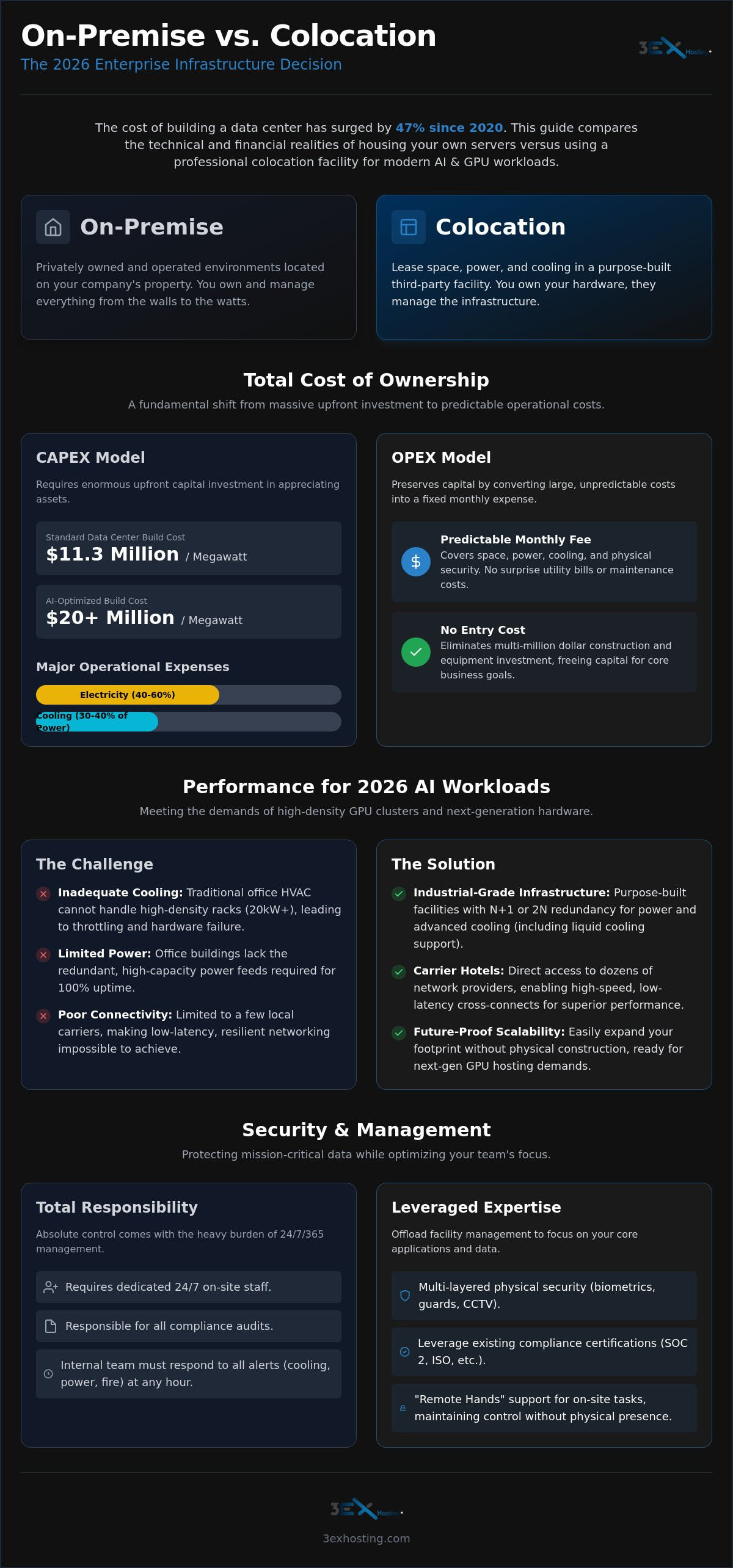
Financial predictability is the cornerstone of a stable infrastructure strategy. When evaluating colocation vs on-premise data center models, the primary shift is from massive upfront Capital Expenditure (CAPEX) to a manageable Operating Expenditure (OPEX). Building a standard enterprise data center in 2026 requires a benchmark investment of approximately $11.3 million per megawatt. If you’re building for AI-optimized workloads, those costs often double to $20 million per megawatt or more. These figures represent significant capital tied up in physical assets that depreciate over time.
Colocation eliminates these massive entry costs. Instead of a multi-million dollar construction project, you pay a predictable monthly fee for the space, power, and cooling you actually use. This model allows you to preserve capital for core business initiatives or hardware upgrades. A thorough review of On-premise vs. colocation pros and cons shows that hidden costs often tip the scale. In an on-premise setup, electricity accounts for 40% to 60% of total operational expenses. Cooling systems alone consume 30% to 40% of that energy. In a colocation environment, these utility costs are managed through industrial-scale efficiency that a single enterprise rarely achieves on its own.
Building for Redundancy: The N+1 Reality
Achieving 100% uptime requires more than just a server rack. It demands N+1 or 2N redundancy for every critical system. For an on-premise facility, this means purchasing and maintaining secondary UPS systems, diesel generators, and redundant cooling loops. The maintenance contracts for these systems are expensive and require specialized technicians. Colocation providers spread these massive infrastructure costs across hundreds of clients. This makes enterprise-grade redundancy accessible without the individual price tag of a utility-grade power plant. You benefit from a tier-certified environment while paying only for your specific footprint.
Operational Efficiency and Resource Allocation
The true cost of on-premise management includes your payroll. You must employ or contract facility engineers who understand HVAC, fire suppression, and high-voltage electrical systems. These aren’t IT tasks; they’re building management tasks. Moving to a colocation facility frees your senior IT staff to focus on high-value projects like software architecture and business logic. It’s about talent density. Instead of your lead architect worrying about a leaking chiller, they can focus on optimizing your GPU clusters for performance. If you’re ready to see how this transition impacts your specific budget, you can request a custom quote to compare the numbers directly.
Scalability further separates these two models. Expanding an on-premise facility often requires a new wing or a complete room retrofit, which can take months and cost millions. Colocation allows for incremental growth. You can add a single cabinet or a private cage as your needs evolve. This agility ensures you aren’t paying for empty, cooled space years before you actually need it. The 5-year hardware lifecycle TCO almost always favors the flexibility of the colocation model.
Infrastructure Performance for 2026: AI and High-Density Needs
The performance gap in the colocation vs on-premise data center debate has widened significantly due to the rapid adoption of generative artificial intelligence. Most legacy on-premise facilities were designed to handle 5kW to 10kW per rack. In 2026, AI training and inference workloads regularly demand 30kW to 50kW per rack. Standard office HVAC systems simply cannot dissipate this level of heat. Attempting to run high-density hardware in a space designed for human comfort leads to thermal throttling, reduced component lifespan, or catastrophic hardware failure.
Professional facilities are now purpose-built for high density GPU colocation. These sites utilize direct-to-chip (DLC) liquid cooling as the default standard for any rack exceeding 40kW. This level of engineering is cost-prohibitive to retrofit into an existing office footprint. By moving to a specialized facility, you ensure your hardware runs at peak performance without the risk of localized hot spots. It is a shift from fighting your environment to leveraging one built for your specific hardware.
Powering the AI Revolution
AI clusters require more than just raw power. They need sophisticated power delivery architectures. Standard on-premise electrical circuits often fail to handle the sustained high-voltage load required by modern GPU clusters. High-density facilities provide metered power and 415V delivery directly to the rack. This reduces transformation losses and improves overall efficiency. Future-proofing your infrastructure means having the headroom to scale to 1.6T networking speeds. Specialized data centers are already equipped with the backend intra-cluster connections needed for GPU-to-GPU communication, ensuring your AI models train at maximum speed.
Connectivity and the Carrier Hotel Advantage
Latency is the silent killer of distributed applications. On-premise setups typically rely on standard enterprise fiber which routes through multiple hops before reaching a major internet backbone. Colocation facilities act as carrier hotels. They provide direct cross-connect services to dozens of Tier 1 providers and major cloud on-ramps. Physical proximity to these backbones reduces latency to microseconds. This carrier-neutral approach also prevents vendor lock-in. You can switch bandwidth providers or add redundant paths in hours rather than weeks. This level of connectivity is essential for real-time AI inference and mission-critical applications that cannot afford even a millisecond of delay.
Security, Compliance, and Disaster Recovery
Security remains a primary pivot point in the colocation vs on-premise data center decision. Many organizations believe that keeping hardware within their own walls provides superior protection. However, maintaining that level of security in-house requires significant payroll and capital. Professional colocation facilities utilize multi-layered protocols that are often cost-prohibitive for a single enterprise. This includes biometric access controls, man-traps, and 24/7 on-site security personnel. These sites are purpose-built to withstand physical breaches and environmental threats. They offer a level of hardening that a standard office building cannot replicate. You won’t have to worry about unauthorized access or the logistical nightmare of maintaining 24/7 surveillance yourself.
Compliance is another area where colocation provides a distinct advantage. If your business handles healthcare or financial data, you must meet strict regulatory standards. Achieving SOC2, HIPAA, or PCI-DSS certification for an on-premise facility is an exhaustive, expensive process. When you utilize a professional data center, you leverage the provider’s existing certifications for the physical infrastructure. This significantly simplifies your own auditing process. You only need to prove the security of your logical data. The physical security of the facility is already documented and verified by third-party auditors, which saves your team hundreds of hours during audit season.
Sovereignty and Private Infrastructure
For organizations with the most sensitive data requirements, private colocation suites provide a strategic compromise. You get the benefits of industrial-grade power and cooling while maintaining the total isolation of an on-premise room. These suites and custom cage solutions allow for physical auditing and strict access lists. You maintain absolute data sovereignty without the burden of maintaining the building’s HVAC or backup generators. It’s private infrastructure without the facility management headache. This model is ideal for highly regulated industries that need the assurance of a locked door but the performance of a high-tier facility.
Disaster Recovery and Business Continuity
Relying solely on an on-premise data center creates a single point of failure. If your local power grid fails or a natural disaster strikes your headquarters, your mission-critical applications go dark. Colocation enables geographic diversity. By placing your backup hardware in a professional facility in a different power grid, you create a robust failover strategy. Modern facilities offer automated network failover through high-speed interconnections. This ensures your business stays online even if your primary site is compromised. This hybrid approach to disaster recovery is the standard for 2026. It combines the speed of local hardware with the resilience of a distributed footprint. If you’re ready to secure your infrastructure, you can explore our data center solutions to see how we harden our facilities against every threat.
Bridging the Gap: Remote Management and Support
The most common objection in the colocation vs on-premise data center debate is the perceived loss of physical control. IT leaders often worry that moving hardware away from the office means losing the ability to respond quickly to physical failures. This fear is understandable but largely outdated in the 2026 landscape. Modern facilities provide transparency and access that often exceeds what is available in a standard office server room. Through advanced monitoring tools and environmental sensors, you maintain granular visibility into your hardware health from any location. You gain the ability to manage your infrastructure with precision while offloading the physical maintenance of the facility itself.
Remote Hands: Your Eyes and Ears in the Data Center
The solution to the distance problem is professional Remote hands support. This service provides 24/7 access to on-site technicians who act as an extension of your internal IT department. Instead of sending your own staff to the facility for routine tasks, you can request a technician to handle them immediately. Common tasks include cable management, hardware swaps, and simple power cycling of unresponsive gear. This drastically reduces your Mean Time to Repair (MTTR) because you don’t have to wait for a team member to travel between sites. Remote Hands is the critical bridge between physical hardware and remote administration. It ensures that your infrastructure is never truly out of reach, even if you are working from a different city or time zone.
Planning Your Migration
Transitioning from an on-premise environment to a colocation facility requires a structured approach. The first step involves auditing your existing hardware for colocation readiness. You need to ensure your rail kits, power supplies, and networking configurations are compatible with the facility’s high-density standards. Many enterprises utilize professional move-in assistance to minimize downtime during this phase. These experts handle the logistics of transport, rack and stack, and initial connectivity. This level of support ensures a seamless transition so your services remain online throughout the move. When you compare the risks of a DIY migration against professional support, the value of expert assistance becomes clear.
Ultimately, the colocation vs on-premise data center choice is about operational agility. Most forward-thinking enterprises are now choosing a hybrid approach. They keep highly localized tasks on-site while moving their heavy-duty computing and AI workloads to professional facilities. This strategy offers the best of both worlds: the convenience of local access and the industrial-grade performance of a specialized data center. By leveraging remote management tools and on-site support teams, you gain a scalable infrastructure that supports your business growth without the operational burden of building management. It is a stable, secure, and future-proof foundation for your enterprise technology.
Future-Proofing Your Enterprise Infrastructure
The landscape of enterprise infrastructure has shifted permanently. The decision regarding a colocation vs on-premise data center is now a strategic choice about long-term scalability and efficient resource allocation. You’ve seen how the extreme costs of building N+1 redundancy and managing the specialized cooling for AI workloads can drain your capital. Transitioning to a professional facility doesn’t mean losing control. Instead, it means gaining a specialized partner that manages the complex facility requirements while your team focuses on core technical innovation.
Our facilities are engineered for the specific demands of 2026. We provide N+1 power and cooling redundancy alongside high-density GPU infrastructure ready for your most intensive AI and machine learning clusters. With 24/7 Remote Hands Support, your hardware is always monitored and maintained by experts. This combination of speed, security, and stability ensures your mission-critical applications stay online without the overhead of building management. Get a custom quote for your enterprise colocation needs today. We’re ready to help you build a stable and high-performing foundation for your digital future.
Frequently Asked Questions
Is colocation more secure than an on-premise data center?
Colocation facilities provide superior physical security compared to most corporate offices. These sites feature multi-layered protection including biometric scanners, man-traps, and 24/7 on-site security guards. While an on-premise server room might only have a badge reader, a professional data center is hardened against both physical intrusion and environmental disasters. You benefit from industrial-grade security protocols without the massive payroll and infrastructure costs of building them yourself.
How does colocation affect latency compared to on-premise servers?
Physical proximity to internet backbones often makes colocation faster than on-premise setups. In a colocation vs on-premise data center comparison, the carrier hotel advantage is decisive. Colocation providers offer direct cross-connects to major network carriers and cloud on-ramps. Standard office buildings route traffic through multiple hops, which increases latency. By placing your servers in a carrier-neutral facility, you reduce the distance your data travels to reach its destination.
Can I still use my own IT team if I move to a colocation facility?
You retain total administrative and logical control over your hardware. Your IT team continues to manage server configurations, software updates, and networking logic just as they did on-premise. The only change is the physical location of the equipment. Moving to a facility actually empowers your team by removing the burden of managing power, cooling, and facility maintenance. They focus on technology while the provider handles the environment.
What happens if the colocation provider loses power?
Data centers utilize N+1 or 2N redundancy to ensure 100% uptime during power grid failures. If the primary utility feed drops, industrial-grade Uninterruptible Power Supply (UPS) systems instantly take over the load. Simultaneously, on-site diesel generators start and can power the entire facility for days. These systems are tested monthly and maintained by specialized engineers, providing a level of reliability that is rarely achievable in a private office environment.
What is the average cost difference between building on-prem and renting a cabinet?
The primary difference is the shift from a high-CAPEX model to a predictable OPEX model. Building a private facility requires millions in upfront capital for construction, cooling, and power infrastructure. In contrast, renting a cabinet involves a monthly service fee. This allows you to scale your infrastructure incrementally. You avoid the stranded capacity problem where you pay for empty, cooled space years before your hardware actually fills the room.
Is colocation better than the public cloud for enterprise workloads?
Colocation is often more cost-effective for steady-state, high-performance, or AI-heavy workloads. While the public cloud offers rapid elasticity, it often comes with unpredictable egress fees and higher long-term costs for high-density hardware. Colocation provides the performance of dedicated hardware with the predictable billing of a lease. Many enterprises use a hybrid approach, keeping mission-critical data in colocation while using the cloud for bursty, less sensitive applications.
What are Remote Hands, and do I need them for colocation?
Remote Hands are on-site technicians available 24/7 to perform physical tasks on your hardware. This includes cabling, swapping drives, or hard-booting servers. While you can manage your servers remotely using software, you need Remote Hands to be your eyes and ears for physical incidents. Utilizing these technicians reduces your Mean Time to Repair (MTTR) and eliminates the need for your own IT staff to travel to the facility for routine maintenance.
Can I customize my security in a colocation facility?
Yes, you can implement additional security layers within your leased space. While the facility provides perimeter and building security, you can choose private cage solutions or individual cabinet locks for added isolation. Many enterprises install their own CCTV cameras and rack-level biometric access within their cages. This allows you to meet specific regulatory requirements or internal auditing standards while still benefiting from the shared infrastructure of the data center.