 SUPPORT


 3EX United States
 Blog
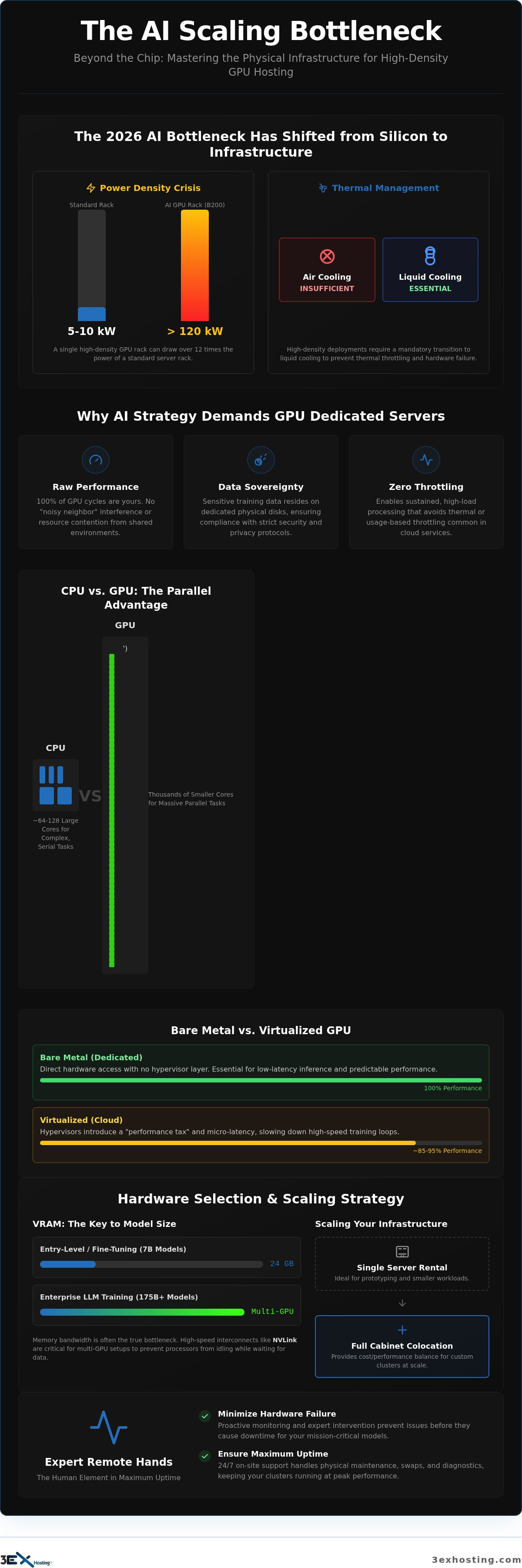
What if the biggest threat to your AI scaling isn’t the availability of NVIDIA Blackwell chips, but the physical limits of your server rack? In 2026, the primary bottleneck for machine learning has shifted from silicon production to data center capacity. Deploying a high-performance GPU dedicated server requires more than just high-end hardware; it demands an environment that can handle the massive thermal and power requirements of modern architectures. You probably already realize that standard air cooling is insufficient when a single rack of B200 or B300 units can pull over 120kW.
This guide will help you master the technical and infrastructure requirements for high-density GPU hosting to scale your workloads with confidence. We’ll explore the necessary transition to liquid cooling, power density management, and the role of expert remote hands in preventing hardware failure. You’ll learn how to build a stable, high-performance environment that ensures predictable costs and maximum uptime for your mission-critical training models. Let’s look at how to turn your infrastructure into a competitive advantage.
Key Takeaways
- Understand why bare-metal performance is essential for AI workloads and how the industry shift toward GPU-centric data centers affects your long-term infrastructure strategy.
- Learn to evaluate VRAM and Tensor Core requirements for various model sizes to ensure your hardware selection aligns with your specific computational demands.
- Master the infrastructure requirements of a GPU dedicated server, specifically the critical transition from air cooling to high-density liquid-cooled environments.
- Identify the strategic tipping point where moving from single server rentals to full cabinet colocation provides the best balance of cost and performance for custom clusters.
- Discover how expert remote hands support minimizes hardware failure risks and ensures maximum uptime for mission-critical machine learning models.
What is a GPU Dedicated Server and Why Does Your AI Strategy Need One?
A GPU dedicated server is a bare-metal machine where the entire computational power of the hardware is reserved for a single tenant. Unlike shared cloud environments, these systems provide direct access to the underlying hardware without a hypervisor layer. By 2026, the data center landscape has transformed. Facilities are no longer just housing rows of general-purpose CPUs; they’re now precision-engineered environments built to support the massive power and thermal demands of high-density AI clusters.
Enterprise strategies now prioritize dedicated hardware for three primary reasons:
- Raw Performance: You get 100% of the GPU’s cycles without “noisy neighbor” interference or resource contention.
- Data Sovereignty: Keeping sensitive training data on dedicated physical disks ensures compliance with strict security protocols.
- Zero-Throttling Environments: Dedicated setups allow for sustained, high-load processing that would trigger thermal or usage-based throttling in a commodity cloud.
Common enterprise use cases in 2026 include training Large Language Models (LLMs) with hundreds of billions of parameters, real-time generative video production, and high-velocity predictive analytics for financial markets. These workloads require the uncompromising stability that only physical hardware provides. For organizations scaling these models, E-Circles LLC provides the specialized AI infrastructure and high-performance GPU server solutions needed for success.
GPU vs. CPU: The Parallel Processing Advantage
Modern AI models rely heavily on matrix multiplication, a task that traditional CPUs handle inefficiently. While a high-end CPU might have 64 or 128 cores optimized for complex serial tasks, a Graphics Processing Unit (GPU) utilizes thousands of smaller, specialized cores. This architecture allows the system to perform millions of mathematical operations simultaneously, breaking the compute bottleneck that once limited deep learning progress. In 2026, TFLOPS (Teraflops) measures the trillion floating-point operations a system completes every second, serving as the definitive benchmark for raw AI throughput and efficiency.
Bare Metal vs. Virtualized GPU Cloud
Virtualization introduces a “performance tax” that many AI teams can’t afford. Hypervisors create micro-latency during data transfer between the CPU and the GPU, which can significantly slow down high-speed training loops. Dedicated hardware is essential for low-latency AI inference where response times are measured in milliseconds. While virtualized clouds offer flexibility for small tests, the long-term cost of ownership for a GPU dedicated server is far more predictable. As your compute needs scale, transitioning from single servers to full cabinet colocation provides the physical control needed to design custom GPU clusters that aren’t limited by a cloud provider’s rigid templates.
Technical Evaluation: Choosing the Right GPU Architecture
Selecting the hardware for a GPU dedicated server requires a precise alignment between your model’s parameter count and the available Video RAM (VRAM). By 2026, entry-level AI tasks using 7B parameter models typically require 24GB of VRAM for comfortable fine-tuning. However, enterprise-grade Large Language Models (LLMs) exceeding 175B parameters demand far more. These massive workloads necessitate multi-GPU configurations where VRAM is pooled across cards. While legacy systems like the NVIDIA V100 Tensor Core GPU set the early standard for parallel processing, modern production environments in 2026 rely on the H200 or the Blackwell B-series to maintain competitive training velocities.
Compute power isn’t the only metric that matters. Memory bandwidth is often the true bottleneck in AI training speed. High-speed interconnects like NVIDIA’s NVLink are essential for multi-GPU setups. They allow GPUs to communicate at speeds far exceeding standard PCIe lanes, which is critical for reducing latency during gradient synchronization. Without sufficient interconnect speed, your expensive processors will sit idle while waiting for data to transfer between cores.
NVIDIA RTX vs. Enterprise-Grade A/H-Series
Consumer-grade RTX cards are excellent for local development and prototyping. They don’t, however, possess the Error Correction Code (ECC) memory required for 24/7 mission-critical production. Enterprise-grade A, H, and B-series GPUs are built for sustained thermal loads and offer significantly higher reliability. In 2026 GPU servers, HBM3e memory provides the 8 TB/s bandwidth necessary to eliminate data transfer bottlenecks during massive model inference. If you’re unsure which architecture fits your current growth trajectory, you can request a technical consultation to review your specific compute requirements.
Future-Proofing for 2026 and Beyond
The rapid release cadence of AI hardware makes future-proofing a necessity. The NVIDIA Blackwell architecture, including the B200 and B300 units, has set a new ceiling for power consumption and performance. Ensure your GPU dedicated server chassis supports PCIe Gen 5 or Gen 6 compatibility to accommodate upcoming accelerator generations. Physical space is also a factor. High-performance GPUs are physically larger and generate more heat than their predecessors. A flexible chassis design allows for easier upgrades as newer, more efficient silicon becomes available. Planning for these physical requirements now prevents a complete infrastructure overhaul when you’re ready to scale your training clusters.
Infrastructure Requirements: Power, Cooling, and Density
A single GPU dedicated server can consume more power than a dozen standard web servers combined. By 2026, the physical reality of AI infrastructure has forced a shift in how we view data center capacity. High-density racks now regularly require 20kW to 50kW of power, with some advanced Blackwell-based clusters drawing over 100kW per cabinet. Standard data centers simply aren’t built for this level of intensity. They often lack the electrical headroom and the specialized floor-loading capacity needed to support the heavy transformers and cooling loops required for high-performance computing (HPC).
Cooling is no longer a secondary consideration; it’s a primary performance metric. While traditional air cooling remains viable for racks up to 20kW through raised floors and high-velocity fans, anything exceeding that threshold necessitates liquid-to-chip or immersion cooling. Liquid cooling is significantly more efficient at removing heat from the dense silicon of a B200 or MI300X, preventing the hardware from reaching critical temperatures that trigger performance degradation. Without these advanced thermal management systems, your hardware’s operational lifespan shortens, and your total cost of ownership rises.
Managing Heat Dissipation for HPC
Thermal throttling is the silent killer of AI performance. When a GPU hits its thermal limit, it automatically lowers its clock speed to prevent physical damage, which renders your expensive compute resources inefficient. Professional High-Density GPU Colocation environments use strict hot and cold aisle containment. This ensures that chilled air is never mixed with hot exhaust, maintaining a consistent temperature for every GPU dedicated server in the cluster. This precise airflow management allows your systems to run at peak TFLOPS for extended periods without interruption.
Power Redundancy and Mission-Critical Uptime
AI training runs often last for weeks or even months. A single power blip can corrupt a training checkpoint, forcing your team to restart from the last save point and wasting significant time and capital. True enterprise facilities provide N+1 power redundancy as a baseline. This means every component, from the UPS systems to the backup generators, has a dedicated failover ready to take the load instantly. You should also look for metered power models. They’re often the most cost-effective way to scale GPU infrastructure because you only pay for the massive energy your processors actually consume during active training cycles rather than a flat, estimated rate.
Scaling Your Infrastructure: From Single Server to Full Cabinets
Many organizations start their AI journey with a single GPU dedicated server to validate models and run initial inference tests. As workloads grow from small-scale prototyping to massive production training sets, the limitations of isolated server rentals become apparent. The tipping point for most enterprises occurs when the need for custom internal networking, specialized security, or lower total cost of ownership outweighs the convenience of a managed rental. At this stage, moving to Full Cabinet Colocation offers the control necessary to build high-performance clusters without the constraints of a generic cloud environment.
Scaling into a full cabinet allows for the implementation of dedicated network interconnects. In a multi-node AI environment, the speed of data transfer between servers is as vital as the compute power itself. Low-latency cross-connects ensure that your GPUs don’t wait for data packets to traverse congested public switches. This architecture is essential for distributed training where synchronization between nodes happens thousands of times per second. By owning the physical layout, you can optimize the switch-to-server ratio to ensure maximum throughput across your entire GPU dedicated server fleet.
Designing Custom GPU Clusters
Successful scaling requires a strategic rack layout. High-density GPU hardware demands precise cable management to avoid obstructing critical airflow paths. You can’t simply stack servers; you must account for the physical dimensions and heat exhaust patterns of modern accelerators. Many enterprises choose to integrate their physical GPU clusters with Cage Colocation to provide a physical buffer for their most sensitive hardware. This setup also allows for hybrid configurations, where physical GPU nodes communicate directly with managed cloud hosting for non-intensive storage or web-facing applications.
Security and Compliance for AI Data
The physical value of AI hardware in 2026 is unprecedented. An 8-GPU server can represent an investment of $550,000 to $750,000. Protecting this asset requires more than just digital firewalls. Private Data Center Suites provide the highest level of physical security and data sovereignty. These suites ensure that only authorized personnel have physical access to the hardware. This is a critical requirement for industries handling sensitive intellectual property or regulated training data. If your AI growth is outpacing your current infrastructure, contact us for a custom colocation quote to secure your high-density environment.
Managed Support: The Role of Remote Hands in GPU Hosting
Managing a GPU dedicated server involves more than just SSH access and software updates. Because these systems operate at extreme power densities and generate significant heat, the physical health of the hardware is a constant variable in your AI performance. High-performance accelerators have specialized maintenance needs that differ from standard web servers. Professional remote hands services act as a technical extension of your IT team, providing the physical presence required to manage complex hardware without requiring your staff to be on-site.
The bridge between your remote developers and the physical data center is built on trust and technical competence. When a GPU node experiences a hardware-level error, every minute of downtime translates into lost training progress and wasted capital. Enterprise-grade hosting provides 24/7 monitoring and rapid hardware replacement strategies. This ensures that if a fan fails or a memory module throws an ECC error, a technician is already moving to resolve the issue before it cascades into a cluster-wide failure. For a deeper dive into operational excellence, consult our sibling article on Remote Hands Support: The Enterprise Guide to Data Center Efficiency.
Minimizing Downtime with On-Site Technicians
Routine maintenance is the only way to ensure long-term GPU longevity. Technicians perform regular inspections of high-density cooling systems, checking for pump efficiency in liquid-cooled loops and ensuring airflow paths remain unobstructed. Effective inventory management is also critical. A professional facility maintains an on-site stock of GPU spares, high-speed networking gear, and specialized power cables to facilitate immediate repairs. Utilizing Remote Hands Services allows you to outsource these physical tasks to experts who understand the nuances of high-density AI infrastructure, ensuring that every GPU dedicated server in your cluster operates within its optimal thermal envelope.
Expert Deployment and Migration
Moving high-value GPU infrastructure into a new data center environment requires precision and careful planning. The sheer weight and fragility of multi-GPU servers mean that standard shipping and handling are often insufficient. Specialized Move-In Assistance provides the logistical support needed to transport and install half-million-dollar nodes safely. A successful GPU server rack-and-stack requires verified power phase balancing, precision-labeled InfiniBand cabling, and validated thermal sensor calibration before the system enters production. These steps prevent the common deployment errors that lead to intermittent connectivity or premature thermal throttling in new AI clusters.
Future-Proofing Your AI Compute Strategy
The evolution of AI training in 2026 demands a shift from commodity cloud thinking to specialized physical engineering. You now understand that a high-performance GPU dedicated server is only as reliable as the power density and cooling systems supporting it. Mastering these technical requirements ensures your models run without thermal throttling or power-related interruptions. Moving from isolated rentals to a controlled colocation environment provides the data sovereignty and performance consistency your enterprise requires. The physical stability of your environment remains the primary driver of your long-term operational success.
Infrastructure shouldn’t be a bottleneck for your innovation. We are a high-density power specialist capable of supporting the most demanding Blackwell or Instinct clusters. Our 24/7 on-site remote hands support acts as a technical safety net, while carrier-neutral interconnectivity ensures your data stays in motion. It’s time to move beyond the limitations of shared resources and build on a foundation of reliability. Get a Custom Quote for Your GPU Infrastructure today and scale your AI workloads with total confidence. Your vision deserves a platform that can keep pace with the speed of silicon.
Frequently Asked Questions
What is the best GPU for a dedicated server for AI training in 2026?
The NVIDIA Blackwell B200 and B300 are the premier choices for large-scale training due to their 192GB to 288GB HBM3e memory. For memory-intensive inference, the AMD Instinct MI300X remains a powerful alternative. Your choice depends on your specific workload; raw compute for training favors NVIDIA’s CUDA ecosystem, while high-memory capacity for inference often makes AMD more cost-effective for specific transformer architectures.
How much power does a high-density GPU dedicated server rack require?
High-density racks in 2026 typically require between 20kW and 50kW of sustained power. Advanced configurations, such as the NVIDIA GB200 NVL72, can push consumption as high as 120kW to 140kW per rack. Most standard data centers can’t support these levels. You’ll need a facility specifically engineered with high-density power distribution and specialized cooling to avoid circuit overloads during peak training cycles.
What is the difference between an NVIDIA RTX and an A100/H100 dedicated server?
NVIDIA RTX cards are designed for workstations and lack the Error Correction Code (ECC) memory necessary for long-term reliability. Enterprise models like the H100 or H200 feature high-bandwidth memory and NVLink support for multi-GPU communication. These enterprise units are built for 24/7 operation under heavy thermal loads, whereas consumer cards often experience performance degradation or hardware failure in high-density server environments.
Can I scale from a single GPU dedicated server to a full colocation cabinet?
You can easily transition from a single GPU dedicated server to a full colocation cabinet as your compute needs expand. Starting with a dedicated server allows you to test your models without a massive upfront investment. Once your training requirements exceed eight GPUs, moving to a full cabinet provides the physical control and custom networking needed to optimize your AI cluster’s performance.
Why is cooling more critical for GPU servers than standard web servers?
Modern GPUs generate significantly more heat than standard CPUs, with some chips reaching a Thermal Design Power (TDP) of 1,200W. Standard air cooling often fails to dissipate this heat in dense configurations, leading to thermal throttling. When a GPU dedicated server throttles, its clock speed drops, which directly increases your training time and costs. Liquid cooling or advanced containment is required to maintain peak TFLOPS.
What are remote hands services and why are they needed for GPU hosting?
Remote hands services involve on-site technicians who perform physical hardware tasks on your behalf. They handle everything from cable management and hard drive swaps to complex GPU replacements and cooling system checks. These services are essential for GPU hosting because the high-value, high-heat nature of the hardware requires immediate physical intervention if a component fails, ensuring your training runs stay on schedule.
Is bare metal GPU hosting better than GPU cloud instances for LLMs?
Bare metal hosting is generally superior for LLM training because it eliminates the virtualization tax that slows down data transfer. Virtualized cloud instances often suffer from inconsistent performance due to shared resources and hypervisor overhead. A dedicated physical environment provides predictable latencies and fixed costs, which is critical when running massive models that require weeks of uninterrupted, high-velocity computation to reach convergence.
How does network latency affect multi-GPU server clusters?
Network latency is the primary bottleneck in distributed AI training where multiple servers must synchronize gradients. If the interconnect speed is too slow, your GPUs will sit idle while waiting for data from other nodes. High-performance clusters utilize InfiniBand or specialized cross-connects to achieve the microsecond latencies required for efficient scaling. Without low-latency networking, adding more GPUs to your cluster will result in diminishing returns.