 SUPPORT


 3EX United States
 Blog
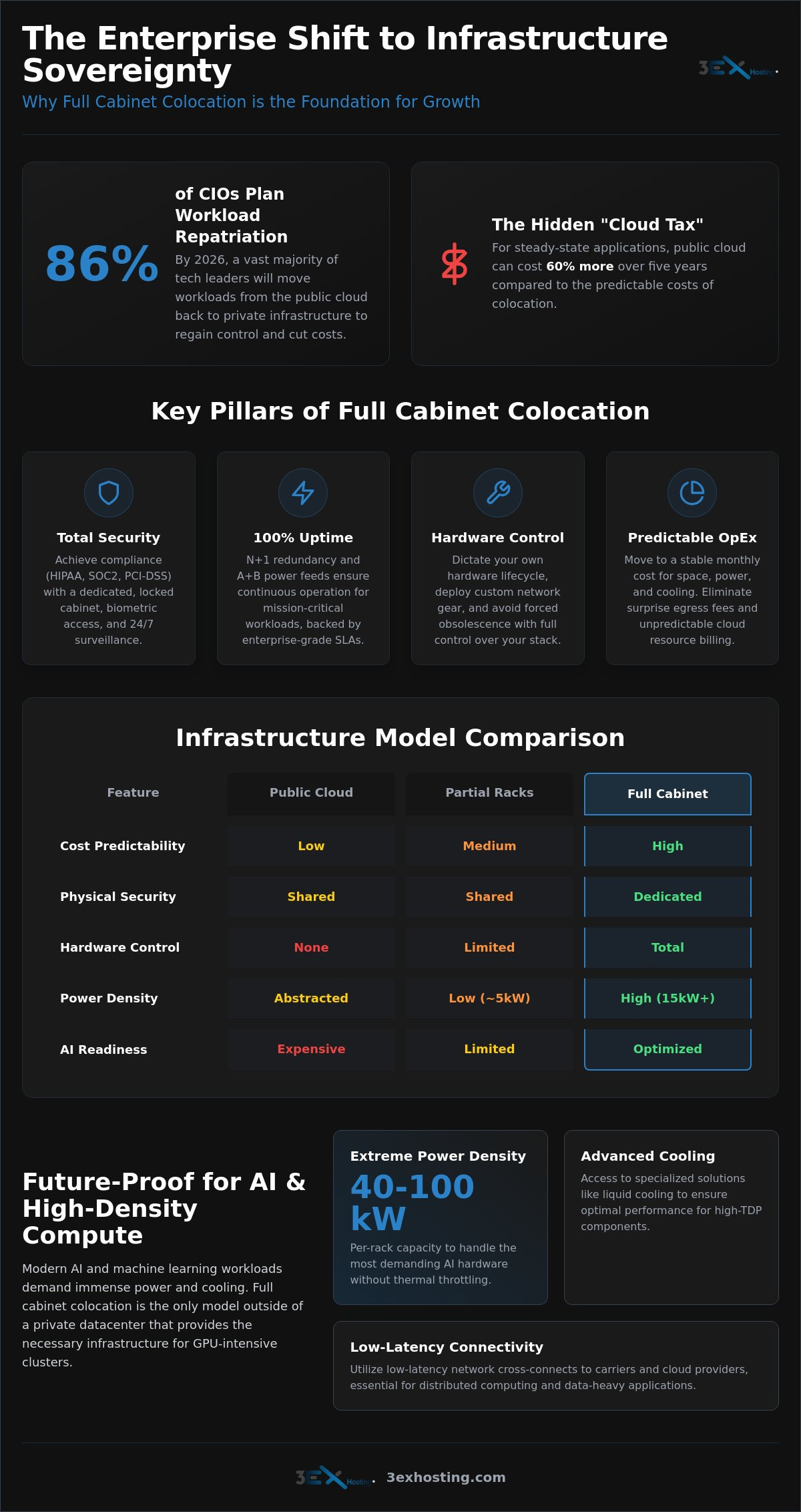
Did you know that 86% of CIOs in 2026 now plan to repatriate at least some workloads from the public cloud back to private infrastructure? For steady-state applications, the cloud can cost 60% more over five years compared to colocation. Many technical leaders recognize that full cabinet colocation for growing businesses is the most stable path toward infrastructure sovereignty. You’ve likely felt the pressure of rising egress fees or the frustration of shared environments that lack the physical security your enterprise data demands.
This guide explains how full cabinet colocation provides the security, power density, and scalability required for enterprise-level growth in 2026. You’ll learn how to transition to a model with predictable monthly costs and total control over your hardware configurations. We’ll examine the essential infrastructure shifts, such as liquid cooling for high-density AI clusters, that ensure your systems handle 40 to 100 kW per rack without compromise. We will also preview the steps needed to achieve zero-downtime scalability for your most critical applications, ensuring your technical foundation remains as dynamic as your business goals.
Key Takeaways
- Identify the growth inflection point where dedicated infrastructure provides better long-term ROI and hardware control than public cloud environments.
- Understand how high-density power configurations and N+1 redundancy ensure 100% uptime for mission-critical enterprise workloads.
- Discover how full cabinet colocation for growing businesses enables AI readiness through GPU-optimized cooling and low-latency network cross-connects.
- Evaluate the strategic advantages of full 42U or 48U racks compared to the high overhead of building and maintaining in-house data centers.
- Execute a seamless migration by auditing hardware requirements and selecting providers based on proven security protocols and uptime history.
The Transition to Full Cabinet Colocation for Growing Businesses
Full cabinet colocation represents a significant shift from shared environments to dedicated infrastructure sovereignty. In a professional colocation centre, a full cabinet typically consists of a dedicated 42U or 48U rack reserved for a single tenant. This isn’t just about extra space. It’s about securing a perimeter where your hardware remains untouched by other users. Many technical leaders reach an inflection point where the convenience of the public cloud no longer justifies the escalating costs of steady-state workloads. When your compute requirements become predictable, the ROI of owned hardware in a dedicated rack becomes undeniable.
Transitioning to full cabinet colocation for growing businesses allows for granular control over environmentals and security protocols. While partial racks or “per-U” hosting might suffice for startups, enterprise-level growth demands the power density and physical isolation that only a full cabinet provides. It’s the standard for companies that have outgrown the limitations of shared infrastructure but aren’t ready to absorb the massive CapEx of building a private data center.
When to Move from Cloud or Partial Racks
The decision to scale often hinges on workload predictability. Public cloud excels at burstable requirements, but for steady-state applications, it can cost up to 60% more over five years compared to colocation. You should consider moving when your monthly egress fees and compute costs consistently exceed the cost of maintaining your own servers. Physical security is another critical driver. If your operations must comply with HIPAA, SOC2, or PCI-DSS standards, a shared rack introduces unnecessary risk. A dedicated cabinet ensures your servers are behind a locked door, accessible only by your authorized personnel. Furthermore, full cabinets allow you to deploy custom networking hardware or specialized firewalls that cloud providers don’t support.
The Business Case for Infrastructure Sovereignty
Owning your hardware lifecycle is a strategic advantage. When you use cabinet colocation services, you dictate when to upgrade and how to configure your stacks. This eliminates the forced obsolescence often found in managed environments. From a financial perspective, full cabinets offer predictable OpEx. You pay for the space and power you use, without the surprise spikes associated with cloud resource consumption. It’s a shift toward stability. You gain the performance of on-premises hardware with the industrial-grade power, cooling, and connectivity of a Tier 3 facility. This combination provides the agility needed to scale without the hidden “cloud tax” that often hampers long-term profitability.
Technical Specifications: Power, Cooling, and Security
High-performance hardware requires more than just floor space. When implementing full cabinet colocation for growing businesses, the facility’s infrastructure must handle the specific thermal and electrical loads of modern enterprise servers. Standard racks often cap at 3 to 5kW, but modern configurations now regularly reach 15kW or higher. This high-density capacity is essential for supporting dense virtualization and GPU clusters without risking thermal shutdowns. Professional facilities ensure that your hardware operates within optimal parameters, regardless of the workload intensity.
Reliability depends on N+1 redundancy. This engineering principle ensures that for every critical component, an independent backup is ready to take over. It guarantees 100% uptime even during routine maintenance or unexpected hardware failures. Beyond power, physical security layers protect your investment. Biometric access, 24/7 surveillance, and individual locking cabinets provide a perimeter that shared hosting cannot match. Reviewing the Types & Benefits of Colocation helps clarify why these physical protections are vital for regulatory compliance and overall risk management.
Redundant Power Architectures (A+B Feeds)
True enterprise reliability uses dual power paths, commonly known as A+B feeds. Your hardware’s redundant power supplies connect to separate Power Distribution Units (PDUs), which are fed by independent circuit paths. If one path fails, the other maintains the load instantly. You should also evaluate billing models carefully. Some providers use per-circuit billing, where you pay a fixed fee for a set capacity. Others offer metered power, which is often more cost-effective for growing businesses because you only pay for the actual kilowatt-hours consumed. Industrial UPS systems and diesel generators serve as the final line of defense, keeping your servers online during utility grid failures.
Environmental Controls and Airflow Management
Modern data centers follow ASHRAE standards to optimize hardware performance and longevity. Cooling isn’t just about blowing cold air; it’s about precision airflow management. Cold-aisle and hot-aisle containment systems prevent the mixing of intake and exhaust air, which significantly improves cooling efficiency. Inside your cabinet, you must use blanking panels to cover empty rack units. This simple step prevents hot air from recirculating and creating dangerous hotspots. Real-time monitoring of temperature and humidity at the rack level allows you to adjust configurations before environmental shifts impact your hardware’s lifespan. If you’re planning a deployment, you can request a custom configuration quote to ensure your specific power and cooling needs are met.
Comparing Full Cabinet Colocation vs. Alternative Models
Selecting the right infrastructure model requires a clear understanding of your long-term operational goals. While smaller businesses might start with partial racks, full cabinet colocation for growing businesses offers a level of autonomy that shared spaces cannot match. The decision usually comes down to Total Cost of Ownership (TCO) and the specific technical requirements of your hardware stack. Analyzing Gartner’s Market Guide for Data Center Colocation reveals that as enterprises scale, the shift toward dedicated physical environments becomes a necessity for maintaining performance and security standards.
Modern infrastructure often utilizes a hybrid approach. This involves integrating your physical hardware in a data center with managed cloud services for burstable needs. This model provides the best of both worlds: the cost-efficiency of owned hardware for steady-state workloads and the flexibility of the cloud for development or testing environments.
Full vs. Partial Cabinets (Half/Quarter)
Partial cabinets are often shared with other tenants, separated only by a mesh divider. This introduces limitations. In a shared rack, you often share power circuits and cooling capacity with neighbors, which can restrict your ability to deploy high-density hardware. Full cabinets eliminate these constraints. You are the sole tenant of the entire 42U or 48U space. This allows for seamless “racking and stacking” as you grow. You don’t have to worry about a migration or IP address changes when you need more space; you simply utilize the empty units already under your control. Security is also a major factor. A full cabinet means only your team has physical access to the rack, reducing the risk of accidental cable unplugging or unauthorized hardware tampering.
Colocation vs. In-House Server Rooms
The temptation to build an in-house server room often fades when you calculate the hidden costs. Professional facilities provide industrial-grade cooling, specialized fire suppression, and redundant power systems that a standard office building cannot support. Maintaining these systems in-house requires significant CapEx and ongoing specialized labor. Reliability is another key differentiator. Most office buildings lack the N+1 redundancy found in a Tier III or IV facility. Carrier neutrality is also vital. In an office, you’re often limited to one or two local ISPs. A professional facility offers access to multiple global carriers via cross-connects, allowing you to optimize for speed and cost. For those looking to move away from office-based servers, our cabinet colocation solutions provide a stable, high-performance alternative that scales with your enterprise.
Future-Proofing Your Rack: High Density and AI Readiness
The demand for AI processing power is fundamentally changing data center design. For those utilizing full cabinet colocation for growing businesses, future-proofing means preparing for power densities that far exceed traditional 5kW limits. By 2026, 76% of AI server deployments are projected to require liquid cooling to manage the heat generated by high-TDP hardware. If your business plans to deploy GPU-intensive clusters, your rack must be ready for high-density power and specialized thermal management from day one. You don’t want to find your growth stalled by a facility that can’t provide the electrical overhead your next-generation servers require.
Choosing a carrier-neutral facility ensures you avoid vendor lock-in. You gain the freedom to switch between multiple ISPs or connect directly to cloud on-ramps. This flexibility is critical as your data requirements evolve. You can optimize both performance and backbone connectivity costs without being tethered to a single provider’s pricing or service limitations.
Adapting for GPU and AI Workloads
Modern AI clusters, such as those running NVIDIA H100 or A100 servers, demand significant electrical overhead. A single AI training rack can require 40 to 100 kW. Standard air cooling often fails at these levels, making direct-to-chip liquid cooling or rear-door heat exchangers a necessity. You need to verify that your provider can support these specific requirements. For a deeper look at these technical demands, see our guide on high density GPU colocation. Ensuring your environment can handle high Thermal Design Power (TDP) hardware is the only way to maintain 100% uptime for AI workloads.
Network Connectivity and Cross-Connect Strategy
Low latency is the lifeblood of national enterprise applications. Cross-connects provide direct, private links to carriers and cloud providers, bypassing the public internet entirely. This reduces jitter and improves security for sensitive data transfers. Utilizing a facility that functions as a carrier hotel allows you to sit at the intersection of major fiber routes. Within your cabinet, you should build a redundant network topology using dual top-of-rack switches. This ensures that a single cable or port failure won’t take your entire cluster offline. It’s about building a robust, resilient path for your data.
As your deployment grows beyond a single rack, you might find that you need even more isolation. Transitioning from individual cabinets to private suites allows you to scale while maintaining a completely custom environment. Request a high-density power consultation to see how we can support your AI roadmap.
Implementing Your Scalable Colocation Strategy
Executing a transition to full cabinet colocation for growing businesses requires a tactical approach that balances technical precision with long-term operational goals. The process begins with selecting a partner based on verified uptime history and security certifications. You must look beyond surface-level promises and evaluate the facility’s adherence to ISO 27001 or SOC 2 standards. A reliable provider acts as an extension of your team, offering the technical stability needed to support enterprise-level scaling. Before the physical move, perform a comprehensive audit of your existing hardware. You need to understand your exact power draw and connectivity requirements to ensure your new 42U or 48U environment is configured for immediate performance.
Ongoing maintenance is the final pillar of a successful strategy. Managing hardware health and maintaining strict cabling standards prevents the “spaghetti” effect that often leads to cooling inefficiencies or accidental outages. By treating your rack as a high-performance asset, you ensure the longevity of your hardware and the reliability of your applications.
Deployment Checklists and Migration
A successful migration relies on meticulous inventory management. You should label every server and switch while documenting their specific power requirements. This allows you to balance the load across redundant PDUs correctly from day one. Logistics can be a significant hurdle for growing teams. Utilizing move-in assistance simplifies the shipping and racking process, allowing your engineers to focus on configuration rather than heavy lifting. Once the hardware is racked, prioritize post-migration testing. Verify that your A+B power failover works as intended and that all network cross-connects meet your latency benchmarks.
Leveraging Remote Hands for Operational Efficiency
Operational efficiency in a distant data center depends on your ability to handle physical tasks without constant travel. Remote Hands Support provides on-site technicians who can perform reboots, swap cables, or replace failed components on your behalf. This service is essential for maintaining 100% uptime, especially during off-hours or emergencies. Utilizing local experts reduces your OpEx by eliminating the need for emergency travel. For national deployments, the strategic use of remote hands support ensures that your infrastructure is managed by professionals who understand the specific nuances of the facility. This support model is the most effective way to ensure your full cabinet colocation for growing businesses remains a resilient and high-performing foundation for your enterprise.
Securing Your Infrastructure Sovereignty for the Next Decade
Transitioning to a dedicated rack is a strategic milestone that replaces public cloud variability with predictable, high-performance infrastructure. You’ve seen how infrastructure sovereignty allows for total hardware control and the implementation of high-density AI clusters. By choosing a facility that adheres to Tier III enterprise data center standards, you protect your growth against downtime and security vulnerabilities.
Full cabinet colocation for growing businesses is more than a storage solution; it’s a commitment to technical stability. With N+1 redundant power and cooling systems, your hardware operates in an environment built for longevity. Our team handles the heavy lifting with 24/7 Remote Hands Support, ensuring that your national deployments receive professional attention at any hour.
Ready to stabilize your scaling strategy with a dedicated environment? Get a Custom Quote for Your Full Cabinet Colocation and take the first step toward a more resilient future. Building a robust technical foundation today ensures your enterprise is prepared for the evolving demands of tomorrow’s hardware landscape.
Frequently Asked Questions
What is included in a full cabinet colocation package?
A standard package includes a dedicated 42U or 48U rack, redundant power feeds (A+B), and industrial cooling. You also receive physical security features like individual locking doors and access to the facility’s carrier network. Most providers include basic monitoring and initial move-in assistance to ensure your hardware is integrated correctly into the environment without technical delays.
How much power can a single colocation cabinet support in 2026?
Standard cabinets typically support 3 to 15 kW, but high-density AI configurations can reach 40 to 100 kW per rack. In 2026, many deployments utilize direct-to-chip liquid cooling to manage these higher thermal loads safely. Your specific power capacity depends on the facility’s electrical infrastructure and the PDU configurations you choose for your hardware stack.
Can I scale from a full cabinet to a private suite later?
Yes, scaling to a private suite is a common progression for businesses that require additional physical isolation or more than five racks. This transition allows you to move your existing setup into a caged area or a dedicated room. It provides a higher level of perimeter security and floor space for custom infrastructure growth as your enterprise expands.
How does colocation help with disaster recovery planning?
Colocation serves as a secondary site for data replication and failover in the event of a primary site failure. By placing your backup hardware in a Tier III facility, you ensure that your recovery environment has redundant power and multiple carrier links. This geographical diversity is a critical component of any resilient business continuity strategy for mission-critical applications.
What is the difference between metered and flat-rate power?
Metered power means you pay only for the kilowatt-hours your hardware actually consumes, while flat-rate power involves a fixed monthly fee for a set capacity. Metered billing is often more cost-effective for full cabinet colocation for growing businesses because it aligns your expenses with actual usage. Flat-rate models provide more billing predictability but may result in paying for unused capacity.
Do I need to be on-site to manage my hardware in a full cabinet?
No, you can manage your systems remotely using on-site technical teams for physical tasks. Remote Hands Support allows technicians to perform reboots, cable swaps, and hardware replacements on your behalf. This 24/7 availability ensures your systems stay online without requiring your staff to travel to the data center for every routine maintenance task.
Is colocation more secure than using a public cloud provider?
Colocation provides superior physical security because you have total control over the hardware and the perimeter. Unlike the public cloud, where your data resides on shared multi-tenant servers, full cabinet colocation for growing businesses places your equipment behind a locked door. This physical isolation, combined with biometric access and 24/7 surveillance, reduces the risk of unauthorized access or hardware-level vulnerabilities.
What connectivity options are available for full cabinets?
You have access to multiple global carriers, cloud on-ramps, and private cross-connects within a carrier-neutral facility. These options allow you to build a redundant network topology with direct links to providers like AWS or Azure. Using local cross-connects instead of the public internet significantly reduces latency and improves the performance of your enterprise applications.