 SUPPORT


 3EX United States
 Blog
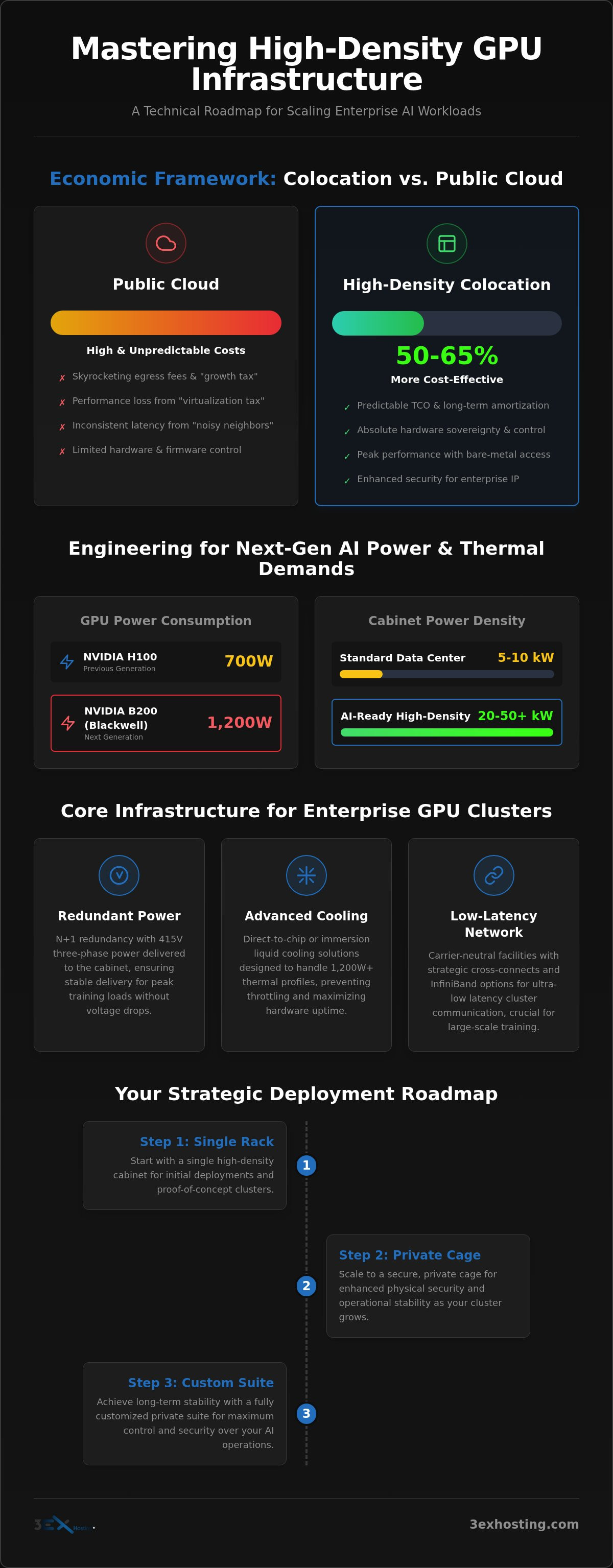
Did you know that running a 4x H100 GPU cluster 24/7 in a colocation environment can be 50% to 65% more cost-effective than using on-demand cloud instances? While the public cloud offers a quick start, the “virtualization tax” and skyrocketing egress fees quickly erode the margins of even the most successful AI projects. If you’re searching for GPU hosting Miami solutions that offer more than just floor space, you’ve likely realized that standard data centers simply aren’t built for the 700W to 1,200W thermal demands of modern Blackwell or H100 architectures.
It’s frustrating to pay premium prices for hardware you can’t fully optimize or cool. We understand that predictable costs and maximum hardware uptime are non-negotiable for enterprise scaling. This guide provides a technical roadmap for mastering high-density GPU infrastructure. You’ll learn how to navigate power density requirements, leverage carrier-neutral connectivity for lower latency, and implement cooling strategies that keep your performance at its peak. We’re moving beyond basic hosting to engineering the specialized environments your AI models actually require.
Key Takeaways
- Learn to calculate the true Total Cost of Ownership (TCO) and eliminate the “growth tax” associated with scaling in public cloud environments.
- Identify the infrastructure requirements for high-density environments capable of supporting 10kW to 50kW+ per cabinet for next-generation AI hardware.
- Discover how carrier-neutral GPU hosting Miami services reduce latency through strategic cross-connects and diverse networking options.
- Master the transition from single-rack deployments to private colocation suites and custom cages for long-term operational stability and security.
The Evolution of GPU Hosting: Moving Beyond the Public Cloud
The transition from experimental AI proofs-of-concept to production-scale clusters has fundamentally changed infrastructure requirements. In the early stages, developers relied on the flexibility of the public cloud to test models. However, as these models move into inference and large-scale training, the economic and technical limitations of cloud-based General-Purpose Computing on Graphics Processing Units (GPGPU) become apparent. For many enterprises, the public cloud evolves from a convenient starting point into a “growth tax” that consumes significant portions of the operating budget.
Securing GPU hosting Miami allows organizations to reclaim hardware sovereignty. This isn’t just about floor space. It’s about having absolute control over custom BIOS settings, firmware versions, and the physical security of the data. High-density colocation has emerged as the standard for the modern AI stack, providing the power and cooling that standard data centers simply cannot provide.
The Limitations of Virtualized GPU Environments
Virtualized cloud instances introduce a layer of performance overhead that can hinder high-performance computing (HPC) tasks. In a multi-tenant environment, you’re often sharing underlying resources with other users. This leads to “noisy neighbor” issues and inconsistent latency. For AI training, where every millisecond of interconnect speed matters, this lack of predictability is a major bottleneck. Data privacy is another critical factor. Storing sensitive training data on shared infrastructure increases the attack surface, making dedicated bare-metal hardware a safer choice for enterprise IP protection.
The Case for Hardware Ownership
Owning your hardware allows for long-term cost amortization that the cloud can’t match. While the initial CAPEX is higher, the TCO over three to five years is significantly lower. For a 4x H100 setup running 24/7, dedicated colocation can be up to 65% cheaper than on-demand cloud instances. Ownership also grants the freedom to customize interconnects. You can choose InfiniBand for ultra-low latency cluster communication instead of standard Ethernet. This level of optimization is essential for scaling Blackwell-based systems that draw up to 1,200W per unit. To start building your dedicated environment, you can explore GPU Colocation options designed for high-density requirements.
Engineering High-Density Environments for AI Workloads
In 2026, the definition of high-density infrastructure has shifted. Standard data centers designed for 5kW to 10kW per rack are no longer sufficient for production-scale AI. High-density colocation is now defined as infrastructure capable of supporting 20kW or more per cabinet. This evolution is driven by the power requirements of chips like the NVIDIA H100, which draws 700W, and the Blackwell B200, which can consume up to 1,200W per unit. When you scale these across a GPU hosting Miami facility, the total rack load often exceeds 50kW.
Engineering these environments requires a departure from traditional data center design. It involves specialized power distribution and thermal management strategies that ensure 100% uptime. N+1 redundancy in both power and cooling systems is the baseline. If a single cooling unit or power feed fails, the system must maintain full operation without thermal throttling. This level of reliability is what separates enterprise-grade facilities from standard colocation providers.
Power Distribution and Scalability
Managing the electrical load of a GPU-intensive rack requires high-voltage power feeds. Standard 120V or 208V circuits often lack the efficiency needed for 50kW cabinets. Modern high-density facilities utilize 415V three-phase power directly to the rack. This reduces line loss and simplifies the power distribution units (PDUs) within the cabinet. During large-scale AI training runs, power draw can spike significantly. Infrastructure must be designed to handle these peak loads without tripping breakers or causing voltage drops. If your current environment can’t scale to these levels, you may need to upgrade to full cabinet colocation designed for AI.
Advanced Cooling for GPU Clusters
Standard air cooling often fails when rack density exceeds 15kW. Hot and cold aisle containment can extend the life of air cooling, but liquid cooling is becoming the standard for Blackwell architectures. Liquid-cooled B200 units require direct-to-chip or immersion cooling to manage the 1,200W thermal profile effectively. Efficient cooling directly impacts your Power Usage Effectiveness (PUE). While the global average PUE is 1.54, high-density facilities targeting AI workloads often achieve 1.2 to 1.3. Lowering your PUE doesn’t just save money; it ensures your hardware operates within safe thermal limits, preventing premature hardware failure and maintaining consistent inference speeds.
Economic Framework: Colocation vs. Public Cloud GPUs
Scaling an AI project beyond the initial training phase requires a rigorous look at the balance sheet. While public cloud providers offer flexibility, their pricing models are designed for short-term bursts rather than sustained production. For organizations utilizing GPU hosting Miami services, the shift from an OPEX-only model to a CAPEX-heavy strategy often pays for itself within the first year of operation. The primary driver of this ROI is the elimination of the “cloud premium,” which includes high markups on hardware and predatory data transfer fees.
A significant portion of the “growth tax” in the cloud comes from hidden egress fees. Major providers often charge between $0.08 and $0.12 per gigabyte for outbound data transfer. For AI companies moving large datasets for inference or synchronization, these fees can quickly eclipse the cost of the compute itself. In a dedicated colocation environment, you own the networking stack and negotiate your own bandwidth, providing a predictable monthly invoice regardless of data throughput. This predictability is essential for maintaining healthy margins as you scale.
Direct Cost Comparison
On-demand pricing for high-performance hardware like the NVIDIA H100 starts at approximately $2.64 per hour. If you run that instance at 100% utilization, you’re looking at nearly $2,000 per month for a single GPU. Research shows that for a 4x H100 setup running 24/7, a dedicated bare-metal server in a colocation facility can be 50% to 65% cheaper per month than cloud instances. This calculation includes the cost of power, which averages $0.13 per kWh nationally. You can find more details on optimizing these setups in The Enterprise Guide to Managed IT Infrastructure.
Value Beyond the Invoice
The economic benefits of dedicated infrastructure extend beyond the monthly bill. Public cloud instances are often preemptible or subject to “noisy neighbor” performance degradation. In a dedicated environment, you have 100% access to your resources 100% of the time. This improves your time-to-market by ensuring training runs aren’t interrupted by provider-side resource constraints. Furthermore, owning the hardware allows you to customize the internal interconnects for your specific model architecture. Whether you need InfiniBand for low-latency training or high-capacity NVMe storage for fast data ingestion, you aren’t limited by the “one size fits all” configurations of a cloud dashboard. Risk mitigation is also handled more effectively through private colocation suites, where physical access is strictly controlled and audited.
Strategic Deployment Checklist for GPU Infrastructure
Deploying high-density hardware requires a fundamental shift in operational focus. While public clouds abstract the physical layer, enterprise-grade colocation demands a strategic approach to deployment logistics. To maximize the ROI of your GPU hosting Miami investment, you must evaluate the facility’s ecosystem beyond just the power socket. Success depends on how well you integrate networking, security, and on-site support into your scaling plan.
Network Connectivity and Interconnects
A carrier-neutral facility is the baseline for enterprise AI scaling. Access to multiple Tier-1 carriers ensures your training data doesn’t get bottlenecked by poor routing or single-provider outages. Redundancy at the network level is as important as redundancy at the power level. Direct Cross-Connect Services allow for sub-millisecond communication between your processing nodes and high-speed storage arrays. This is vital for checkpointing large language models where data throughput is the primary performance limiter. When selecting a provider for GPU hosting Miami, prioritize facilities that offer diverse fiber paths and low-latency interconnects.
Operational Continuity and Support
Hardware failure is a statistical certainty in high-density environments. Unlike the cloud, where instances are simply restarted on new hardware, dedicated infrastructure requires a plan for physical maintenance. 24/7 remote hands support acts as your on-site engineering team. Whether it’s hot-swapping a failed NVMe drive or re-cabling an InfiniBand switch, having expert technicians available at all hours is mission-critical. This service effectively eliminates the need for your core engineering team to be physically present at the data center. You can explore the benefits of Remote Hands Support to understand how it streamlines hardware lifecycle management.
Physical security is the final pillar of a strategic deployment. Ensure the facility maintains SOC2 and HIPAA compliance to protect your proprietary training data and user privacy. Look for multi-factor authentication, biometric access, and continuous video surveillance. These protocols ensure that your dedicated infrastructure remains secure from unauthorized physical access. If you’re ready to secure your dedicated AI footprint, you can request a custom configuration quote to begin your deployment.
Future-Proofing AI Operations with Dedicated Infrastructure
AI infrastructure is evolving at an unprecedented pace. With the release of the NVIDIA H200 and the upcoming Blackwell Ultra architectures, the power and cooling requirements we discussed in previous sections will only intensify. Future-proofing your operations means building a foundation that can accommodate these shifts without requiring a complete teardown of your physical environment. By choosing a high-density GPU hosting Miami provider, you ensure that your facility is ready for the 1.2kW+ thermal profiles of next-generation silicon.
A hybrid cloud strategy is often the most resilient path forward. You can keep your experimental workloads and burst capacity in the public cloud while migrating your core, high-utilization clusters to dedicated colocation. This approach provides the best of both worlds: the agility of the cloud and the economic sovereignty of owned hardware. It allows you to maintain control over your most valuable IP and data while scaling your compute power linearly across a stable, predictable platform.
Scaling with Private Suites and Cages
As your AI clusters grow, your infrastructure needs will likely outpace a standard row of cabinets. The transition from shared colocation space to private suites offers a higher degree of physical security and environmental control. These private environments allow for custom cage layouts that can be optimized for specific airflow requirements or specialized liquid cooling loops. For a deeper look at the strategic benefits of this transition, refer to our Guide to Colocation Sovereignty. Customizing your footprint ensures that you aren’t just renting space; you’re building a fortress for your computational assets.
Building a Long-Term Infrastructure Partnership
Selecting a provider for GPU hosting Miami is a long-term commitment. It requires a partner who understands the technical nuances of high-density power and the absolute necessity of carrier-neutral connectivity. Your facility should function as a robust carrier hotel, providing access to a national fabric of Tier-1 providers. This connectivity ensures that your AI services remain accessible with minimal latency, regardless of where your end-users or data sources are located.
3EX Hosting serves as the foundation for enterprise AI sovereignty. We provide the technical stability and speed required to scale from a single rack to full private suites. Our expertise in managing high-density environments allows you to focus on developing and deploying your models while we handle the complexities of the physical layer. If you’re ready to secure your long-term infrastructure and move beyond the limitations of the public cloud, you can get a custom quote for your GPU infrastructure today.
Securing Your Competitive Edge in the AI Era
Scaling AI infrastructure is no longer a matter of simple server space. It’s a complex engineering challenge that requires specialized power densities and thermal management. By moving beyond the public cloud, your enterprise can reclaim hardware sovereignty and eliminate the “growth tax” that erodes margins. Transitioning to a dedicated environment ensures that your Blackwell or H100 clusters operate at peak performance without the latency or security risks of shared virtualization.
3EX Hosting provides the technical foundation for this transition. Our facilities offer N+1 power and cooling redundancy and high-density rack support up to 50kW+ to handle the most demanding workloads. With 24/7 remote hands technical support, your team can focus on model development while we manage the physical layer. If you’re ready to optimize your long-term infrastructure costs and performance, it’s time to explore professional GPU hosting Miami solutions.
We’re here to help you navigate the complexities of high-performance computing. Request a High-Density GPU Hosting Quote and secure your computational future today.
Frequently Asked Questions
What is the maximum power density supported for GPU colocation?
High-density facilities support up to 50kW per rack or more. This capacity is essential for Blackwell B200 clusters that draw 1.2kW per unit. Unlike standard data centers capped at 10kW, specialized GPU hosting Miami environments utilize 415V three-phase power. This ensures consistent power delivery during peak training loads. Engineering for these densities prevents thermal throttling and maximizes your hardware’s computational output.
How does carrier neutrality benefit AI infrastructure performance?
Carrier neutrality allows you to choose from multiple Tier-1 network providers. This flexibility prevents vendor lock-in and ensures your AI infrastructure has redundant paths to the global internet. You can optimize for the lowest latency routes to your specific data sources. It also provides price leverage, as providers must compete for your business. This environment is critical for maintaining high uptime for real-time inference applications.
Can I use remote hands support for GPU hardware upgrades?
You can utilize remote hands technicians for all physical hardware lifecycle tasks. This includes installing new GPU cards, swapping failed NVMe drives, or performing memory upgrades. These on-site experts act as your local engineering team, available 24/7. It eliminates the need for your staff to travel for routine maintenance. This service is a standard feature of professional GPU hosting Miami providers, ensuring your cluster remains operational around the clock.
What happens if my GPU cluster requires specialized liquid cooling?
Specialized facilities are designed to accommodate both air-cooled and liquid-cooled hardware. If your cluster uses direct-to-chip or immersion cooling, the infrastructure provides the necessary water loops and heat exchangers. This is becoming mandatory for next-generation chips like the NVIDIA Blackwell architecture. Managed cooling environments maintain precise temperature ranges, which extends the lifespan of your expensive silicon and keeps Power Usage Effectiveness (PUE) ratios low.
How do colocation costs compare to public cloud GPU instances at scale?
Colocation costs are significantly lower for sustained, high-utilization workloads. While public clouds offer low entry costs, they charge premiums for 24/7 compute and outbound data transfer. Research indicates that a dedicated 4x H100 setup in a colocation facility can be 50% to 65% cheaper than cloud on-demand instances. Owning the hardware allows you to amortize the CAPEX over several years, leading to a much lower total cost of ownership.
Is it possible to scale from a full cabinet to a private suite?
You can easily scale your footprint as your AI operations expand. Most enterprise facilities offer modular options, allowing you to transition from a single full cabinet to private cages or dedicated colocation suites. This path provides increased physical security and customizable layouts for your growing cluster. Private suites also allow for specialized security audits and custom environmental controls, making them ideal for high-stakes enterprise AI projects.
What security certifications should I look for in a GPU data center?
Enterprise GPU data centers should maintain SOC2 Type II, HIPAA, and PCI DSS certifications. These audits verify that the facility follows strict protocols for physical security, data privacy, and operational reliability. Look for providers that offer multi-factor biometric access and continuous video surveillance. These standards ensure your proprietary training data and sensitive intellectual property are protected against unauthorized physical access or environmental disasters.
How does cross-connect availability affect AI model training latency?
Direct cross-connects significantly reduce latency by creating a physical link between your GPU cluster and storage or network peers. This bypasses the public internet and multiple hops that slow down data ingestion. During AI model training, fast data throughput is vital for maintaining high GPU utilization. Low-latency interconnects ensure that your processing nodes aren’t waiting for data, which directly accelerates your training timelines and improves inference response speeds.