 SUPPORT


 3EX United States
 Blog
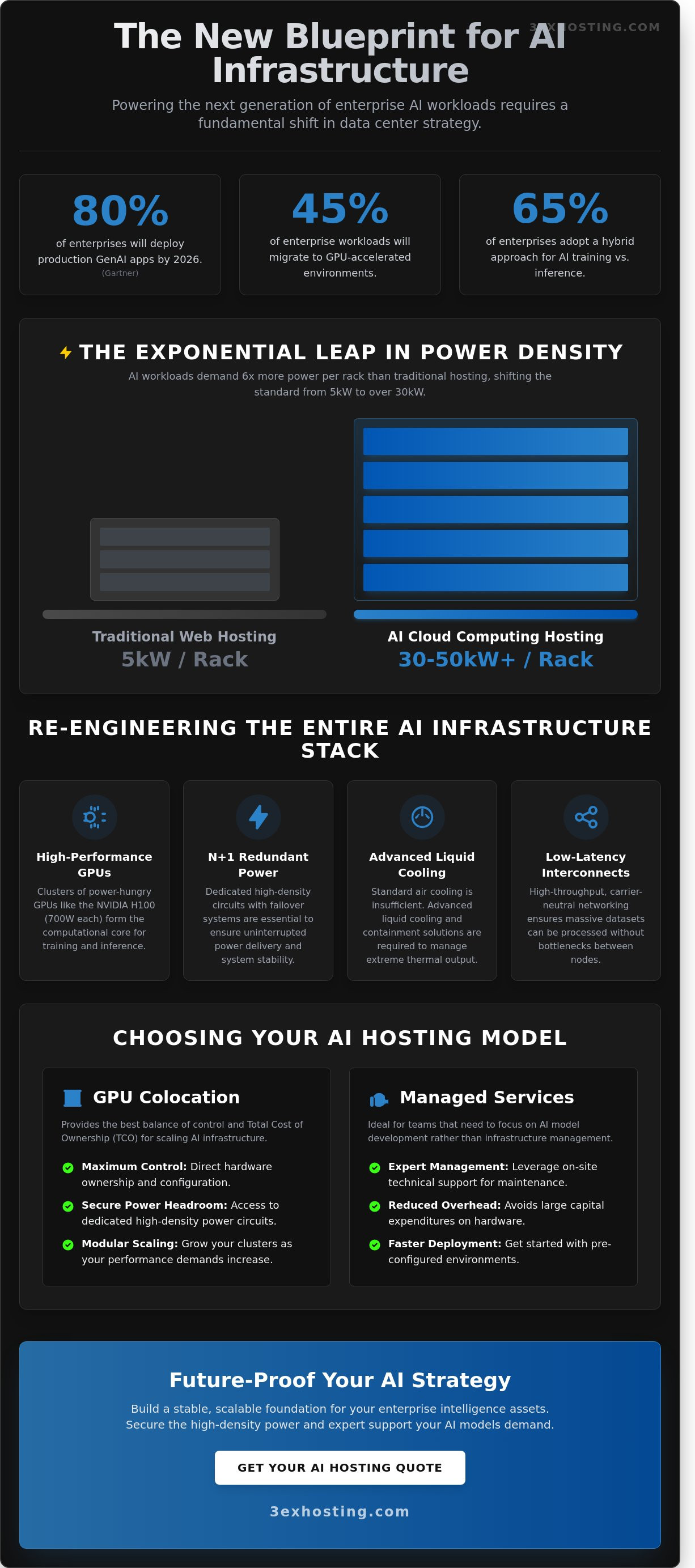
Gartner predicts that by 2026, 80% of enterprises will have deployed generative AI-enabled applications in production environments. You likely feel the pressure to scale, but you’ve already seen how standard public cloud instances lead to unpredictable monthly bills and thermal throttling during peak training cycles. It’s frustrating when you lack direct control over specialized GPU resources. This guide simplifies AI cloud computing hosting by detailing the essential infrastructure requirements and scaling strategies needed to power modern workloads. We’ll move past the marketing hype to focus on technical stability and reliability.
You’ll discover the critical differences between software-level platforms and hardware-level infrastructure. We’ll help you identify the right hosting model for your specific AI lifecycle stage, whether you’re in the R&D phase or full-scale inference. We also provide a technical roadmap for optimizing high-density power and cooling. You’ll learn how to secure the superfast performance your models demand. Let’s build a stable foundation for your enterprise intelligence assets.
Key Takeaways
- Understand the critical shift from general-purpose cloud environments to high-throughput, GPU-accelerated infrastructure designed for 2026 workloads.
- Learn how to manage extreme power densities of 30kW+ per rack using advanced liquid cooling and specialized containment solutions.
- Evaluate whether managed services or GPU colocation provides the best balance of control and TCO for your AI cloud computing hosting strategy.
- Discover modular scaling techniques and low-latency interconnectivity requirements to ensure your AI clusters maintain peak performance as they grow.
- Identify why carrier-neutral facilities and expert on-site technical support are essential for maintaining a flexible, future-proof AI ecosystem.
What is AI Cloud Computing Hosting and Why Does It Matter?
AI cloud computing hosting isn’t just another flavor of virtualized servers. It’s a specialized architecture designed for parallel processing and massive data throughput. Standard cloud models often struggle with the sheer volume of operations required by modern neural networks. By 2026, industry analysts predict that 45% of enterprise workloads will migrate to GPU-accelerated environments to keep pace with demand. Understanding What is AI Cloud Computing Hosting helps clarify why traditional CPU-based systems fail when running Large Language Models (LLMs). These models need thousands of cores working in sync, not sequential processing. A standard server will quickly bottleneck under the weight of a 70-billion parameter model, leading to system instability and slow response times.
High-performance computing (HPC) has moved from academic labs to the core of enterprise strategy. It’s no longer a luxury for researchers; it’s a requirement for any business integrating real-time AI into their workflow. Modern AI cloud computing hosting provides the reliability that prevents system crashes during heavy inference loads. Professional hosting providers focus on technical stability and superfast connectivity to ensure these complex systems remain reachable and responsive 24/7.
The Evolution of AI Infrastructure
The landscape has shifted from basic CPU setups to high-density clusters featuring NVIDIA H100 and the newer B200 Blackwell chips. These units provide the superfast compute power necessary for modern AI. Specialized hardware like Google’s TPUs and Groq’s LPUs are also entering the market to solve specific throughput bottlenecks. AI cloud hosting is the nexus of high-density hardware and low-latency networking. This evolution means businesses must look beyond simple storage and focus on specialized hardware that can handle billions of operations per second without overheating or lagging.
Inference vs. Training: Different Hosting Needs
Training and inference have distinct hardware profiles that require different approaches to hosting. Businesses often waste resources by using the same setup for both tasks.
- Training: This phase demands high-bandwidth interconnects and petabyte-scale storage to process vast datasets. It’s a resource-heavy process that needs maximum power.
- Inference: This is about delivering the result to the end-user. It requires low latency and hardware located in a data center close to the user to avoid delays.
65% of enterprises now adopt a hybrid approach to balance these needs. This strategy ensures they get the stability they need for training while maintaining superfast response times for inference. It’s a logical way to manage costs while keeping performance at the highest level.
Choosing the right environment is about more than just raw speed. It’s about finding a partner that understands the technical demands of AI. If you’re ready to scale your infrastructure, you can get a quote to see how professional hosting can support your specific AI workloads.
Critical Infrastructure Requirements for AI Workloads
AI workloads demand a level of physical infrastructure that standard data centers weren’t built to provide. Transitioning to AI cloud computing hosting requires a shift from standard 5kW racks to high-density environments capable of supporting 30kW or even 50kW per cabinet. This isn’t just a matter of plugging in more power; it’s about re-engineering the entire stack to handle the thermal and data throughput of modern GPUs. When compute density increases, every component from the power whip to the network switch must be optimized for sustained high-load performance.
Managing High-Density Power Demands
Modern GPUs, such as the NVIDIA H100, can consume up to 700W each. When grouped into clusters, these chips drive power requirements per rack to levels 6 times higher than traditional web hosting. Achieving stability in these environments requires N+1 redundancy to ensure that power delivery remains uninterrupted even during a component failure. Many enterprises find that full cabinet colocation is the only way to secure the power headroom and dedicated circuits necessary for scaling. Integrating these systems requires following the Key Considerations for Scaling AI Infrastructure to manage the operational risks associated with such high-intensity hardware. High-density power is the foundation of any reliable AI deployment, and without it, hardware cannot reach its full clock speeds.
Thermal Management and Cooling
Traditional air conditioning cannot dissipate the heat generated by a 30kW AI rack. Air is an inefficient medium for heat transfer at these densities, often leading to hot spots that trigger hardware throttling. Data centers are shifting toward advanced liquid cooling solutions, including direct-to-chip cooling and rear-door heat exchangers. These systems capture heat at the source, ensuring environmental stability for sensitive high-performance hardware. Specialized hot and cold aisle containment is also vital to prevent the mixing of air streams, which can improve cooling efficiency by up to 40% in high-density configurations. Understanding the full scope of these GPU server hosting high-density trends and infrastructure requirements is essential for any enterprise planning to scale AI workloads into 2026.
Network Fabric and Storage Throughput
AI models rely on massive datasets that must move quickly between storage and compute nodes. Bottlenecks at the network level can leave expensive GPUs idling, which wastes capital and increases training time. To prevent this, 400G Ethernet and InfiniBand have become the industry standards for low-latency, high-bandwidth communication. These fabrics allow for the seamless data movement required by AI cloud computing hosting architectures.
Storage must keep pace with these network speeds. Superfast NVMe SSDs are non-negotiable for AI data pipelines because they provide the millions of IOPS required to feed data to the processors without delay. While traditional SATA SSDs might suffice for standard applications, they create massive bottlenecks in training environments. If you’re looking to optimize your stack for maximum throughput, you can request a quote for a custom high-performance configuration designed for AI.
Choosing Your Model: Managed Cloud vs. GPU Colocation
Selecting the right model for AI cloud computing hosting depends on your project’s current lifecycle. Managed cloud services provide immediate access to high-end GPUs like the NVIDIA H100. This speed is vital for short-term experiments or proof-of-concept phases. However, shared environments often suffer from “noisy neighbor” issues. This happens when other users on the same physical host consume shared resources, which can reduce your processing throughput by 15% or more during peak hours. For organizations scaling production models, the high hourly rates of public clouds often become a financial liability within 12 to 18 months. To see how enterprises have navigated these exact challenges, explore this enterprise case study on GPU cloud hosting and scaling AI infrastructure that details real-world solutions for avoiding throttling and unpredictable egress costs.
GPU colocation shifts the strategy toward hardware ownership. It delivers maximum control over the entire stack and a lower total cost of ownership for steady-state workloads. You aren’t paying a premium for a provider’s management layer. Hybrid cloud models offer a balanced middle ground. You can maintain dedicated baseline infrastructure for 80% of your training tasks while using the public cloud for temporary burst capacity. This setup also protects data sovereignty. Sensitive AI models often require private infrastructure to meet strict compliance standards, ensuring proprietary data never leaves a controlled environment. According to industry analysis on AI infrastructure selection criteria, balancing this flexibility with dedicated stability is essential for long-term performance. For a detailed breakdown of how these deployment models compare on performance, cost, and reliability, see our AI GPU hosting comparison of cloud, dedicated, and colocation options in 2026.
When to Move to Dedicated Infrastructure
Identify your “cloud exit” tipping point by monitoring GPU utilization rates. When your instances run at 70% capacity for more than 10 hours a day, renting becomes significantly more expensive than owning. Owning your hardware allows for custom cooling and networking configurations that public providers simply don’t support. For proprietary models that require absolute isolation, private data center suites provide the ultimate physical and logical security. You get a dedicated environment where your superfast hardware operates without outside interference. Enterprises ready to make this transition can find a detailed technical roadmap in our guide to high density GPU colocation for AI infrastructure in 2026, which covers power specs, liquid cooling architectures, and total cost of ownership strategies.
The Role of Managed Services in AI
Owning hardware doesn’t mean your team has to manage every cable and power supply. Modern AI cloud computing hosting relies on experts to handle the complex physical layer. Integrating managed it infrastructure allows your data scientists to focus on refining models rather than monitoring server heat signatures. High-performance GPUs generate immense heat and require specialized power distribution units. Professional 24/7 monitoring is mandatory for these expensive assets. A single fan failure can lead to thermal throttling, wasting thousands of dollars in compute time. Professional management ensures your hardware runs at peak performance levels around the clock.
Key Considerations for Scaling AI Infrastructure
Scaling AI infrastructure isn’t just about buying more GPUs. It requires a roadmap that balances immediate performance with long-term flexibility. Effective AI cloud computing hosting demands an environment that can adapt as models grow from millions to billions of parameters. You need a strategy that accounts for power density, thermal management, and rapid data movement.
Building for Modular Scalability
Startups often launch with a few server nodes, but scaling typically happens in bursts. High-density cage solutions provide the physical isolation and power overhead necessary for these transitions. Modern AI chips require significant power and cooling. Designing for 60kW per rack from the start prevents the need for a complete footprint overhaul when you upgrade to next-generation hardware. Planning for physical expansion ensures you can add capacity without disrupting existing clusters. It’s much easier to expand within a dedicated cage than to migrate entire racks to a new hall when you outgrow your initial space.
Connectivity and Low Latency
Network speed determines how fast your model learns. Distributed training relies on constant communication between nodes. If latency exceeds 5 milliseconds, synchronization delays can throttle your entire cluster’s efficiency. Leveraging carrier hotels provides direct access to global fiber backbones, ensuring your data moves without bottlenecks. Network proximity to data sources accelerates model refinement by reducing the time required for iterative weight updates and dataset synchronization. Direct cross-connects within the data center eliminate the unpredictable hops of the public internet, providing the stable throughput required for 24/7 training cycles.
Security and Disaster Recovery
Protecting your weights and datasets is a top priority. Intellectual property in the AI sector is worth billions, making it a target for sophisticated attacks. You need a host that offers physical security layers and strict access controls. Enterprise AI requires compliance with standards like SOC2 or ISO 27001. This isn’t just a checkbox; it’s a requirement for handling sensitive training data safely.
Beyond security, business continuity is vital. A 2023 Uptime Institute study revealed that 60% of data center outages cost organizations over $100,000. Geographically redundant backups and 24/7 remote hands support are essential to keep your AI-powered applications running during hardware failures. Don’t let a single power failure or hardware glitch wipe out weeks of expensive training progress.
Future-Proofing Your AI Strategy with 3EX Hosting
Scaling an AI model from a localized sandbox to a global production environment requires more than just raw GPU power. It demands a carrier-neutral ecosystem where you aren’t locked into a single provider’s network limitations or pricing structures. 3EX Hosting provides this essential flexibility, allowing you to interconnect with multiple Tier-1 carriers to ensure your AI cloud computing hosting remains resilient and high-performing. By utilizing a carrier-neutral facility, you can reduce latency by up to 30% compared to single-homed environments, which is a critical factor for real-time inference and large-scale data ingestion.
The transition from a prototype to a production-grade AI deployment often reveals hidden operational frictions. High-density AI hardware generates immense heat and requires specialized power configurations, often exceeding 15kW per rack. 3EX Hosting eliminates these headaches through specialized data center services designed for high-performance computing. We provide the technical stability and cooling infrastructure necessary to prevent thermal throttling, ensuring your hardware runs at peak efficiency around the clock.
- Avoid vendor lock-in with diverse connectivity options.
- Scale power density as your model complexity grows.
- Minimize downtime with redundant power and cooling systems.
- Access expert physical support for complex hardware configurations.
The Strategic Value of Remote Hands
Hardware failures are an inevitable part of managing large-scale server clusters. When a GPU node requires a physical reset or a drive swap at 2:00 AM, your internal team shouldn’t have to scramble to the data center. This is where remote hands support acts as a seamless extension of your IT department. Our on-site technicians handle everything from precise cable management to complex hardware swaps, maintaining a 99.999% uptime record for mission-critical services. You manage the software and neural networks; we manage the copper, glass, and silicon.
Getting Started with Enterprise AI Hosting
Success in the AI space requires a foundation that’s as fast as your algorithms. Before migrating, it’s vital to conduct a customized infrastructure audit to evaluate your current workload. We analyze your specific GPU requirements and storage throughput to determine the best hosting fit for your unique needs. This data-driven approach prevents over-provisioning and ensures you only pay for the performance you actually use. If you’re ready to scale your AI cloud computing hosting to a professional, enterprise-grade level, Get a custom quote today and secure the technical backbone your innovation deserves.
Future-Proof Your Enterprise AI Strategy
The transition to 2026 requires a fundamental shift in how businesses approach high-density workloads. Success relies on infrastructure that handles the intense heat and power demands of modern GPUs. You need access to high-density power configurations up to 30kW+ per rack to ensure your hardware runs at peak efficiency. Relying on carrier-neutral facility access gives you the flexibility to optimize connectivity and achieve superfast data transfer speeds across global networks.
Choosing a reliable partner for AI cloud computing hosting is the most critical decision for your long-term scalability. 3EX Hosting delivers the technical stability required for mission-critical operations. With 24/7 on-site Remote Hands support, our professional technicians act as an extension of your team, managing physical maintenance so you don’t have to. This expert approach ensures your systems stay online and your data remains secure.
Explore Enterprise AI Infrastructure Solutions at 3EX Hosting
Your journey toward a more robust and efficient AI environment starts with a rock-solid foundation.
Frequently Asked Questions
What is the best GPU for AI cloud computing hosting in 2026?
The NVIDIA Rubin architecture is the premier choice for 2026, as it succeeds the Blackwell generation. This platform utilizes HBM4 memory to manage the massive parameters found in next-generation large language models. It delivers significantly higher throughput than the 20 petaflops offered by the previous B200 chips. Choosing this hardware ensures your AI cloud computing hosting environment remains competitive for complex inference and training tasks.
How much power does a typical AI server rack require?
A typical AI server rack in 2025 and 2026 requires between 60kW and 100kW of power. This represents a massive jump from the 10kW to 15kW seen in traditional data centers. High-density deployments using NVIDIA H100 or B200 clusters demand specialized power delivery systems. You can’t run these setups in standard facilities without significant electrical upgrades to support the increased load.
Is colocation cheaper than public cloud for AI training?
Colocation is cheaper for long-term AI projects that run for more than 12 months. Industry benchmarks show that owning or leasing hardware in a colocation facility can reduce total cost of ownership by 30% to 40% compared to hourly public cloud rates. While public clouds offer instant scalability, the sustained compute needs of AI training make fixed-cost colocation a more stable financial choice for established enterprises. To understand exactly how these costs and capabilities stack up across every deployment model, review our in-depth AI GPU hosting comparison covering cloud, dedicated, and colocation in 2026.
What is the difference between AI hosting and standard web hosting?
The primary difference lies in the reliance on GPUs and high-speed interconnects rather than just CPUs. Standard web hosting manages HTTP requests using processors like Intel Xeons, while AI cloud computing hosting utilizes thousands of Tensor cores for parallel processing. You’ll also find NVMe SSD storage and 400Gbps networking as standard requirements here to prevent data bottlenecks during model training.
Can I run AI workloads on managed cloud hosting?
You can run AI workloads on managed platforms like AWS SageMaker or Google Vertex AI to simplify deployment. These services automate the infrastructure setup, which reduces your time-to-market by approximately 70%. It’s a great option if you don’t have a dedicated DevOps team. However, you’ll pay a premium of 20% to 25% for this convenience compared to managing raw GPU instances yourself.
How do I protect my AI models in a shared data center environment?
Use hardware-based Trusted Execution Environments (TEEs) and Confidential Computing to secure your models. This technology encrypts data while it’s being processed in the GPU’s memory, so other tenants can’t access it. NVIDIA’s H100 and newer chips support these security features natively. It’s the most reliable way to ensure your proprietary weights and training data remain private in a shared infrastructure.
What kind of network speed is required for AI cloud computing?
You need a minimum of 400Gbps InfiniBand or Ethernet speeds for efficient AI cluster communication. Modern distributed training relies on RDMA technology to allow GPUs to exchange data without involving the CPU. If your network speed drops below these benchmarks, your expensive GPUs will sit idle while waiting for data. Most 2025 clusters are already moving toward 800Gbps to support larger datasets.
How does cooling impact AI server performance?
Cooling directly impacts performance by preventing thermal throttling, which can slow down a GPU by 50% or more. High-performance chips like the B200 generate over 700W of heat, making traditional air cooling insufficient. Direct-to-chip liquid cooling is now the industry standard because it’s 3,000 times more effective at heat transfer than air. Our superfast systems stay stable because we prioritize advanced thermal management to keep every chip at peak clock speeds. For a deeper look at how these cooling and power trends are reshaping the industry, explore our analysis of GPU server hosting infrastructure trends heading into 2026.