 SUPPORT


 3EX United States
 Blog
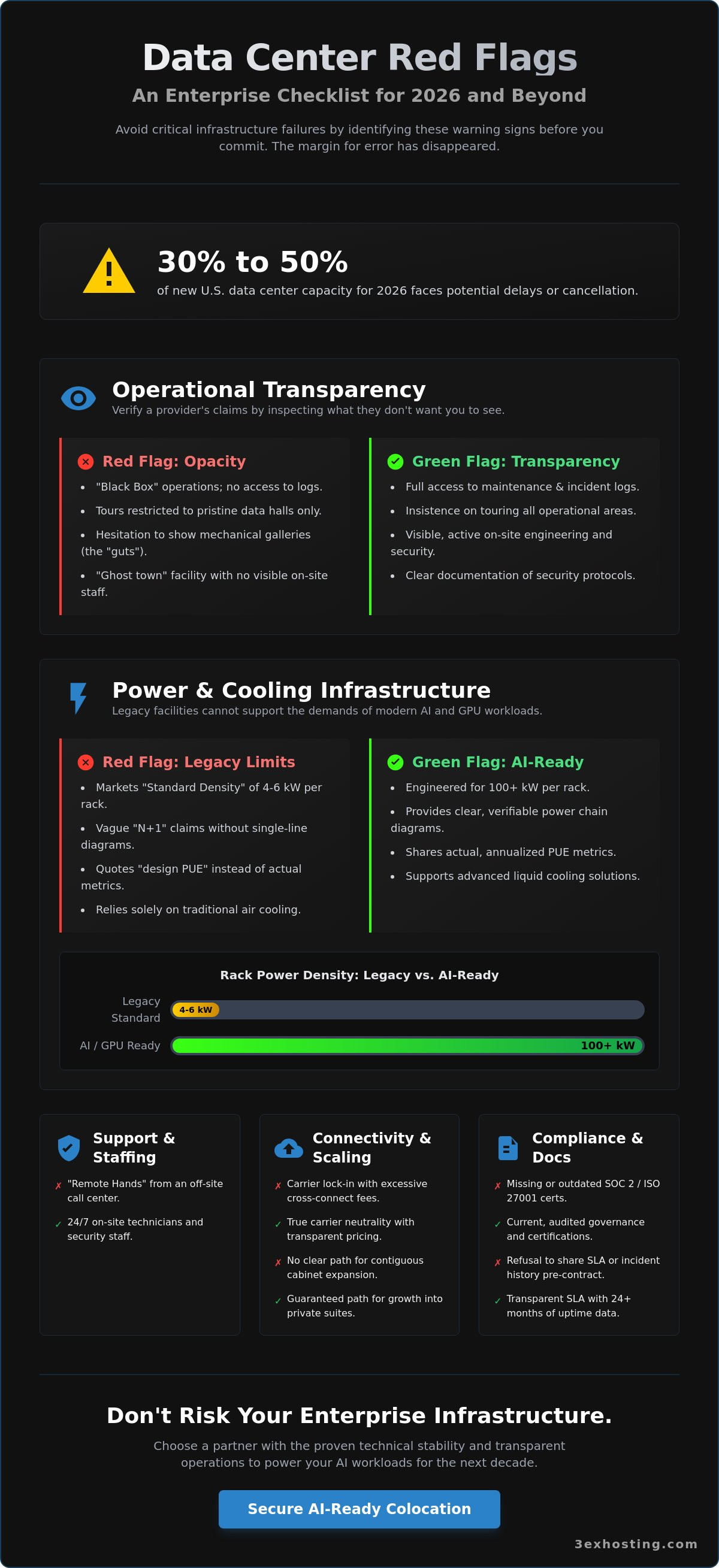
What if the facility you choose today is legally barred from expanding its power grid by the time you’re ready to scale? With 30% to 50% of the U.S. data center capacity scheduled for 2026 facing potential delays or cancellations, the margin for error has disappeared. Identifying the subtle red flags when selecting a data center is no longer just a procurement task; it’s a critical risk management strategy for your entire enterprise infrastructure.
We understand the anxiety that comes with shifting legacy workloads to high-density environments, especially when hidden cross-connect fees and inadequate off-hours support threaten your bottom line. You need a partner that doesn’t just promise uptime but demonstrates the technical stability to handle 100 kW racks and evolving NEC 2026 safety standards. This guide provides a definitive checklist to help you vet providers with confidence. You’ll learn how to verify true carrier neutrality and ensure your selected facility can support your AI and GPU scaling needs for the next decade without hitting a cooling bottleneck.
Key Takeaways
- Identify operational opacity by looking beyond the data hall and insisting on a full review of maintenance logs and mechanical galleries.
- Avoid the density trap by vetting cooling infrastructure for 2026 AI workloads rather than accepting outdated “standard” power levels.
- Recognize red flags when selecting a data center that signal carrier lock-in, such as excessive recurring fees for simple cross-connect services.
- Ensure technical stability by verifying the presence of on-site Remote Hands support instead of relying on centralized, off-site call centers.
- Future-proof your enterprise by confirming a clear path for contiguous cabinet expansion and dedicated private colocation suites.
Operational Opacity: The First Red Flag of Inadequate Governance
Operational opacity is a silent killer for enterprise reliability. It occurs when a provider treats their internal processes like a black box, shielding you from the reality of their day-to-day management. If a provider hesitates to share maintenance logs or recent incident reports, it’s one of the most significant red flags when selecting a data center. Transparency isn’t just a courtesy; it’s the only way to verify that the infrastructure is managed to the standards your business requires. A lack of transparency during the initial onboarding process almost always predicts future support failures when you need them most.
A “clean” tour is a common trap for unsuspecting IT leaders. Sales teams often keep visitors in the pristine, brightly lit areas of the data center white space. However, the real story of a facility lives in the mechanical galleries. If you aren’t permitted to inspect the cooling towers, fuel pumps, and switchgear rooms, the provider may be hiding deferred maintenance or aging equipment. In 2026, infrastructure must be impeccable to handle the heat loads of AI and GPU workloads. Any hesitation to show you the “guts” of the building suggests they don’t trust their own systems.
The “Ghost Town” Facility Audit
Walk through the facility and look for the people. A high-performance facility should have visible, on-site security and engineering staff. If the halls feel like a ghost town, it’s a sign that support is likely outsourced or spread dangerously thin across multiple sites. Ignoring the lack of visible personnel is one of the common red flags when selecting a data center that leads to critical support delays later. Check the battery rooms for signs of neglect, such as dust buildup or visible corrosion. Pay attention to security protocols during your visit. If you’re allowed to move through the facility without consistent badge checks or an escort, their physical security is a liability you can’t afford.
Documentation and Compliance Gaps
In 2026, regulatory oversight is at an all-time high. Missing SOC 2 Type II or ISO 27001 certifications is no longer acceptable for enterprise-grade providers. These aren’t just badges; they represent audited governance. A refusal to share an actual SLA before you sign the contract is a massive warning sign. You need to review the last 24 months of uptime and incident history to understand their true performance under pressure. Outdated certificates or a lack of familiarity with the NEC 2026 Article 270 updates indicate a lack of investment in modern safety and stability. If they can’t manage their own documentation, they won’t manage your private colocation suites with the precision you expect.
Power and Cooling: Red Flags in High-Density Infrastructure
Power availability is the primary bottleneck for data center development in 2026. As U.S. power demand is projected to reach 35 to 45 GW by 2030, many legacy facilities are struggling to keep up. If a provider markets “Standard Density” of 4 to 6 kW per rack as their baseline, it’s one of the major red flags when selecting a data center for enterprise growth. Modern AI and HPC workloads often target over 100 kW per rack. A facility capped at legacy power levels isn’t just behind the curve; it’s a scalability dead end for your infrastructure.
Redundancy claims also require deep scrutiny. The “N+1” trap is a common way providers misrepresent their resilience. They might have N+1 at the UPS level but lack it in the cooling loop or the generator plant. You should ask for a single line diagram of the power chain. If they share generators across multiple buildings without dedicated, reserved capacity for your specific load, your “redundancy” is an illusion during a regional grid failure. True reliability requires a clear, non-shared path from the utility to your cabinet.
Be wary of PUE (Power Usage Effectiveness) numbers that seem too good to be true. While modern designs aim for high efficiency, some legacy providers quote “design PUE” rather than actual, annualized metrics. If a facility with 15 year old chillers claims a PUE of 1.2, they’re likely excluding critical loads from their calculations. Technical stability depends on honest metrics, not marketing figures designed to mask aging, inefficient cooling systems.
The Limits of Traditional Air Cooling
Traditional air cooling is reaching its physical limit. To support high density GPU colocation, a facility must have more than just floor tiles. Look for poorly sealed or non-existent hot-aisle containment; this is a sign that the cooling system is working harder than it should, increasing the risk of thermal hotspots. In 2026, a future-proof facility should already have a roadmap for liquid-to-chip cooling. If they can’t explain how they’ll integrate coolant distribution units (CDUs) into their floor plan, they aren’t ready for the next five years of AI evolution.
Power Redundancy and Metering Issues
Transparency in consumption is just as vital as the power itself. A lack of granular, real-time monitoring for metered power is a red flag that prevents you from optimizing your spend. You shouldn’t wait for a monthly bill to discover a spike in usage. Furthermore, ask for the replacement schedule of the UPS batteries. If they’re nearing the end of their five year lifecycle without a documented replacement plan, you’re inheriting their risk. For a detailed look at how we manage these technical specifications, you can request a technical brief from our engineering team.
Connectivity Constraints and the Carrier Lock-In Red Flag
Connectivity isn’t just about having fiber in the ground. It’s about who controls the access to that fiber. Many providers claim to be carrier-neutral but then impose high monthly recurring charges (MRC) for simple cross-connects. This is a predatory pricing model that effectively locks you into their preferred ecosystem. If a facility lacks a dedicated, physical Meet-Me-Room (MMR), it’s a clear sign of a restrictive networking environment. Without a neutral MMR, you lose the ability to negotiate with multiple carriers, which destroys your leverage and your disaster recovery redundancy within the data center.
Identifying red flags when selecting a data center involves looking closely at the commercial structure of its networking. You might find a facility that calls itself a “Carrier Hotel,” but if the owner funnels all traffic through their own “Blended Bandwidth” product, you’re losing direct carrier access. While blended bandwidth can simplify operations, it shouldn’t be your only option. Direct access to Tier 1 carriers is essential for low-latency applications and complex BGP configurations that your enterprise might require as you scale toward 2026 networking standards.
True Carrier Neutrality vs. Marketing Claims
Don’t take a provider’s carrier list at face value. Verify the number of active carriers versus those that are merely “available” at the street curb. There’s a massive difference between a carrier having a presence in the building and them having an active, lit port ready for service. One of the most significant red flags when selecting a data center is when the facility owner also happens to be the only ISP on-site. This conflict of interest usually leads to higher costs and slower resolution times for circuit issues. You need diverse fiber entry points. If all carriers enter through the same conduit, a single backhoe incident can take your entire enterprise offline, regardless of how many providers you have on paper.
The Hidden Costs of Cross-Connects
Identify predatory pricing models early by asking for a full schedule of fees for cross-connect services. Some providers use these as a high-margin revenue stream rather than a utility, charging thousands in recurring costs for a cable that costs fifty dollars. If lead times for a simple fiber patch exceed 48 to 72 hours, it signals deep operational inefficiency. In 2026, your infrastructure should also support software-defined interconnection (SDI). This allows for rapid, flexible hybrid cloud connections without the traditional overhead of physical patches. If a provider avoids discussing SDI or lacks a clear interconnection roadmap, they’re likely tethered to an outdated, high-cost business model.
Support Limitations: When “Remote Hands” are Out of Reach
Support is often the last item on a procurement checklist, yet it’s the first thing you’ll regret overlooking. A major red flag when selecting a data center is a support model that relies entirely on a centralized call center. When a critical server drops offline at 3:00 AM, you don’t want to explain your cabinet location to a Tier 1 operator located in a different time zone. You need to know that a qualified engineer is already on the floor, ready to respond. If a provider uses “Best Effort” language in their response time clauses, they’re telling you that your emergency isn’t their priority. This lack of accountability is a common trait of “real estate only” facilities that lack the specialized expertise required for complex managed IT infrastructure.
Outsourced security or facility management is another risk to your enterprise sovereignty. When the people guarding the door or managing the chillers don’t work for the data center owner, the chain of command breaks. This fragmentation often leads to finger-pointing during an outage. Professionalism demands a unified team that takes ownership of the entire environment, from the perimeter fence to the rack-level power distribution. Identifying these red flags when selecting a data center early can save your team from hours of frustration during a hardware crisis.
The Reality of 24/7/365 Remote Hands
Don’t wait for a crisis to test your remote hands support. During your due diligence, ask what specific tasks technicians are authorized to perform. A massive red flag is a facility where Tier 1 staff are restricted from touching internal components or performing basic drive swaps. You need on-site professionals who understand enterprise hardware, not just how to flip a circuit breaker. Technical stability depends on having experts who can act as your eyes and ears when your team can’t be on-site. If the staff seems unfamiliar with modern GPU clusters or high-density cabling, they aren’t prepared for 2026 workloads.
Onboarding and Move-In Friction
The onboarding process is a window into your future relationship. If a provider doesn’t offer comprehensive move-in assistance, you’re effectively on your own for the most critical phase of deployment. Look for signs of a slow, bureaucratic quote process. If it takes a week to get a price for a single cabinet, it’ll likely take even longer to get support for a hardware failure. A partner that values speed and efficiency will provide rack-and-stack services and inventory management to ensure your transition is seamless. For immediate assistance with your deployment, contact our on-site engineering team today.
Scaling Hurdles: Red Flags for Future-Proofing AI and Cloud
Growth is the only constant in enterprise technology, yet many facilities are physically incapable of supporting it. Vacancy rates in primary U.S. markets fell to a record-low 1.6% in early 2025, which means capacity is now a finite resource. If a provider is operating at 95% capacity with no clear path for contiguous cabinet expansion, they’re effectively a dead end for your business. This is one of the most critical red flags when selecting a data center. If you can’t grow your footprint within the same data hall, you’ll eventually face the operational nightmare of managing fragmented infrastructure across different floors or even different buildings.
Security and sovereignty also become scaling bottlenecks if the provider lacks flexible physical options. A facility that only offers standard cabinets without the ability to deploy private colocation suites or custom cage solutions limits your long term compliance strategy. As your AI and cloud workloads become more sensitive, you need the option for physical isolation and dedicated cooling zones. A provider that forces you into a one size fits all model is falling behind the requirements of 2026 enterprise standards. They should be able to demonstrate a clear roadmap for power upgrades and cooling retrofits to handle the 100 kW rack densities that AI evolution demands.
Contiguous Expansion and Sovereignty
Fragmented infrastructure increases latency and complicates cable management. You should always verify that a provider has reserved space or a right of first refusal on adjacent cabinets. A major red flag when selecting a data center is the presence of restrictive rules on custom cabinet heights or depths. If they can’t accommodate the specific physical dimensions of modern GPU clusters, they aren’t a technology partner; they’re just a landlord. Technical stability requires a facility that adapts to your hardware, not the other way around. Ask to see their floor plan for the next 24 months to ensure their growth projections align with your own.
The Verdict: Choosing a Strategic Infrastructure Partner
The industry has shifted away from “real estate” providers that simply sell floor space and power. In 2026, you need a technology partner that understands the nuances of high-density cooling, carrier neutrality, and on-site technical support. Your data center selection is a 10 year decision that will define your ability to innovate or leave you trapped in a legacy bottleneck. Don’t settle for a facility that hides behind clean tours and marketing jargon. Demand transparency in their maintenance logs, power redundancy, and expansion capabilities. To ensure your infrastructure is built on a stable, scalable foundation, get a custom colocation quote from our engineering team and experience the difference of a partner that prioritizes your long term success.
Securing Your Infrastructure for the Next Decade of Innovation
Selecting a facility is a strategic commitment that dictates your enterprise’s ability to scale. You’ve seen how operational opacity and legacy cooling systems act as silent bottlenecks for AI growth. Identifying the red flags when selecting a data center early prevents the “N+1” traps and predatory cross-connect fees that stall progress. Technical stability depends on a partner that offers High-Density AI & GPU Ready Infrastructure and Carrier-Neutral Connectivity with Direct Cross-Connects. Your infrastructure deserves a home that adapts to your hardware, not one that limits it.
Don’t settle for “best effort” response times when your uptime is on the line. Our team provides 24/7/365 On-Site Remote Hands to ensure your systems are always managed by experts who understand enterprise hardware. We prioritize technical excellence and transparency so you can focus on your core business objectives. Take the next step toward a more reliable, future-proof environment today.
Request a Transparent Quote for Your Enterprise Infrastructure and build your future on a foundation of speed and reliability.
Frequently Asked Questions
What is the most common red flag during a data center site visit?
The most common red flag is restricted access to the facility’s mechanical galleries and cooling towers. If a provider only shows you the pristine data hall, they might be hiding aging infrastructure or deferred maintenance. You should insist on seeing the fuel pumps, backup generators, and chiller plants to verify they’re clean and well-maintained. A refusal to show the “guts” of the building suggests a lack of confidence in their own systems.
How can I verify if a data center is truly carrier-neutral?
Verify carrier neutrality by requesting a list of active, on-site fiber providers and checking for a neutral Meet-Me-Room (MMR). Truly neutral facilities don’t prioritize their own bandwidth products or charge predatory fees for cross-connects. You should also check if the facility owner is the dominant ISP, as this conflict of interest often leads to higher costs and limited leverage for your enterprise networking needs.
Is a high PUE always a red flag for an enterprise data center?
A high PUE isn’t always a dealbreaker, but it’s one of the red flags when selecting a data center that indicates aging infrastructure. For 2026 workloads, a PUE significantly above 1.5 suggests the facility may struggle with the thermal demands of modern GPU clusters. While some legacy designs are naturally less efficient, you need to ensure the provider has a clear roadmap for cooling retrofits to support your long-term scaling.
What should I look for in a data center Service Level Agreement (SLA)?
Look for 100% uptime guarantees on both power and cooling with specific, tiered financial credits for any downtime. Avoid agreements that use “best effort” language or lack clear definitions for incident response times. A professional SLA should clearly outline the provider’s accountability and provide you with financial protection against costly outages. If the SLA is vague or difficult to obtain, it’s a sign of inadequate governance.
Can a data center support AI and GPU hosting if they only use air cooling?
Air cooling can support AI workloads only at lower densities, typically capped around 20 to 30 kW per rack. As high-density GPU hosting targets 100 kW per rack in 2026, a lack of liquid-to-chip readiness is a significant scaling bottleneck. You shouldn’t commit to a facility that can’t explain how they’ll integrate coolant distribution units (CDUs) into their floor plan as your computational needs evolve.
Why is “Remote Hands” support considered a critical selection factor?
On-site Remote Hands support is critical because it provides immediate technical intervention during hardware failures. Without it, your team must travel for simple tasks like drive swaps or cable patches, which increases your mean time to repair (MTTR). You need on-site professionals who understand enterprise hardware, not just a centralized call center that dispatches a technician from another location hours later.
What are the warning signs of financial instability in a data center provider?
Warning signs include stalled infrastructure projects and a refusal to share recent audit reports. These are major red flags when selecting a data center because they suggest the provider lacks the capital to maintain technical stability or meet evolving safety standards like NEC 2026. Frequent ownership changes or a lack of investment in modern compliance like SOC 2 Type II also indicate a high-risk partner.
How do I identify if a facility has adequate physical security for compliance?
Adequate security is identified by multi-factor authentication, biometric scanners, and 24/7 on-site personnel. You should verify that the facility follows strict visitor logging and has comprehensive video surveillance with at least 90 days of storage for compliance audits. If you can move through the facility without consistent badge checks or an escort during your tour, their physical security protocols are likely insufficient for enterprise sovereignty.